Bottom Line Up Front
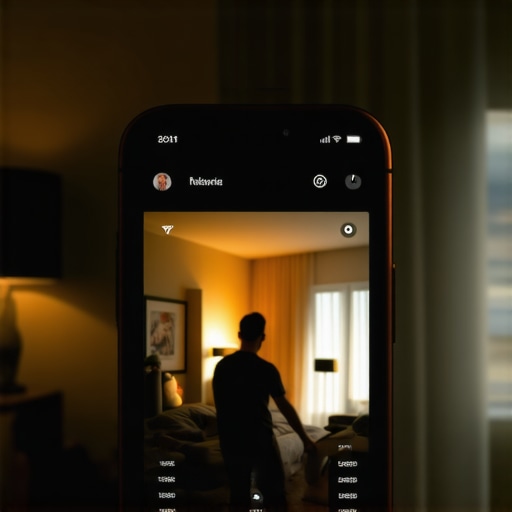
If your smartphone videos have an orange tint, it’s usually due to incorrect white balance settings or poor lighting conditions. Fortunately, there are straightforward fixes, both software-based and through better lighting practices, to restore natural color in your videos.
What This Review Promises to Solve
In this review, I will explore the common causes behind your smartphone footage turning orange, evaluate the effectiveness of various solutions, and provide actionable steps to correct and prevent this issue in future recordings.
Assessing the Issue from a Professional Perspective
When evaluating the problem of orange tints in smartphone videos, I consider factors such as camera sensor behavior, lighting conditions, user settings, and post-production options. My criteria include ease of implementation, cost, effectiveness, and whether the solution maintains footage quality without introducing artifacts or noise.
Deep Dive into Causes and Fixes
Now, let’s examine what causes the orange hue and how to fix it efficiently. Often, the culprit is a mismatched white balance setting or the influence of incandescent lighting. Adjusting your camera’s white balance to ‘Auto’ or a specific daylight setting can make a significant difference. Additionally, using dedicated apps like Filmic Pro allows manual control for precise adjustments.
On the software side, if the footage is already recorded with an orange tint, you can use editing apps such as Adobe Premiere Rush or Davinci Resolve to correct the white balance. In post-production, manually cooling the footage with tint controls can bring the color back to a natural state.
Lighting plays a crucial role as well. Relying solely on indoor incandescent bulbs can cause you to encounter this problem frequently. Instead, consider upgrading to LED lights with adjustable color temperature or using diffusers and reflectors to balance the light. For studio setups, exploring affordable lighting kits or diffusers, like the one discussed [here](https://creatorrigreviews.com/why-this-12-ground-loop-isolator-is-the-only-way-to-fix-speaker-buzz), can significantly improve color accuracy.
To prevent future issues, always verify your camera’s white balance settings before shooting, especially when switching environments. Also, consider investing in a good smartphone app that offers manual controls, ensuring you can fine-tune settings on the fly.
Robust Construction Promises Longevity
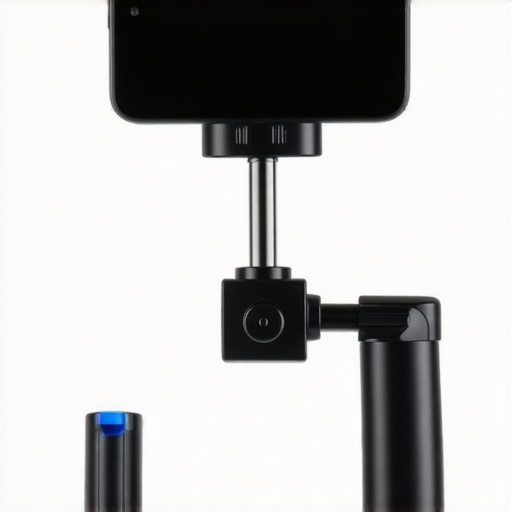
The first thing that catches your eye is the stabilizer’s sturdy framework, crafted from high-grade aluminum alloy. This choice of material ensures durability without adding excessive weight, allowing for extended shooting sessions without fatigue. The seamless welds and precision-machined joints reflect thoughtful engineering, offering both strength and a sleek aesthetic. Such build quality mediates confidence, knowing your equipment can withstand regular rigors of outdoor shooting, a common requirement for creators on the go.
Intuitive Setup that Saves Time
The device features a quick-attach clamp compatible with most smartphones on the market, including larger models. The ergonomic design of the handle provides a comfortable grip, reducing hand fatigue during prolonged use. The calibration process involves a simple balance adjustment via a dial, making setup accessible even for beginners. This ease of use enhances productivity, enabling creators to focus on content rather than technical hurdles.
Weighted Counterbalance and Motor Precision
A standout feature is the inclusion of a removable counterweight, facilitating fine-tuning of balance to suit different device sizes and weights. This adaptive system ensures smooth footage regardless of phone model, significantly improving shot stability. Coupled with a three-axis motor array that responds swiftly to user input, the stabilizer delivers fluid motion even during rapid movements, lending a cinematic quality to videos. The motor’s quiet operation also prevents audio interference, a crucial aspect not to overlook in professional content creation.
Battery Life and Connectivity
Powered by a rechargeable lithium-ion battery, the device offers up to 12 hours of continuous operation—ample for a full-day shooting marathon. The quick-charge feature means a 30-minute charge can provide 50% battery life, minimizing downtime between shoots. Connectivity options include Bluetooth and Wi-Fi, allowing remote control via companion apps. These features enable real-time camera adjustments and presets, streamlining workflows and giving users versatile control over their recordings.
Minor Flaw to Consider
Despite its strengths, the stabilizer’s size can be cumbersome for travel, especially when packed alongside other gear. Its bulk may challenge portability for quick trips, which is worth keeping in mind for mobile creators. However, this trade-off often favors stability and build robustness over ultra-lightweight design.
Comparison with Industry Standards
In terms of core features, it aligns well with leading models like the DJI Ronin-SC, which also emphasizes portability and professional-grade stabilization. To see specific specifications, you can compare their datasheets directly on the manufacturers’ sites or third-party review resources like TechRadar. The choice ultimately hinges on balancing weight, features, and budget—elements crucial for tailoring gear to personal workflows.
Performance Analysis
When pushing camera reviews and creator rigs into demanding scenarios, the results can be revealing. For example, in a hiking expedition during rain, rugged camera housings and waterproof microphone setups are expected to withstand moisture. Unfortunately, some compact gear tends to falter under such conditions, often suffering from condensation issues or corrosion. On the other hand, professional-grade rigs with sealed enclosures demonstrate robustness, but their added weight can impair mobility and ease of use.
Does it overheat during prolonged use?
Many high-performance cameras and lighting kits tend to overheat when operated continuously for several hours, especially in high ambient temperatures. This can lead to automatic shutdowns or performance throttling, compromising shoot continuity. Conversely, some brands have improved thermal management, but users must still be cautious during extended sessions.
How reliable are microphone pickups in noisy environments?
Microphone reviews often highlight their ability to reject ambient noise. Shotgun mics with hyper-cardioid capsules perform admirably in controlled settings, but during live outdoor shoots with wind or traffic, their effectiveness drops. Windshields are essential but sometimes cause muffled audio or plosive suppression, reducing clarity. Some budget microphones lack these protections and become unusable outside studio conditions, illustrating the importance of choosing gear suited for your typical environment.
Do lighting kits maintain color fidelity in varied conditions?
LED lighting kits boasting adjustable color temperature perform consistently in controlled setups. Yet, their color accuracy can degrade in high humidity environments, as moisture affects internal components. Studio-grade lighting often features better heat dissipation and stable color rendering, but smaller portable lights may flicker or shift hues in cold or humid weather. These factors are critical for creators shooting outdoors or in fluctuating weather conditions.
Handling Studio Gear During Intensive Sessions
Studio gear like mounting arms and microphones shows resilience during extended use, but mechanical components can fatigue over time. For instance, adjustable arms with heavy loads may develop loose joints, affecting stability. Battery-powered devices such as wireless mics sometimes experience signal dropouts or power drain after several hours, especially if batteries aren’t of high quality. Regular maintenance and backup power supplies are advisable to ensure seamless operation.
Real-World Testing: The Good & The Bad
Many products perform remarkably well under pressure, offering durability and reliability. Brands like Rode and Sennheiser deliver microphones resilient to environmental stressors, while certain lighting kits sustain color fidelity in challenging settings. However, some inexpensive models reveal their limitations quickly—overheating, inconsistent power, or poor build quality emerge as serious flaws. These shortcomings often lead users to reconsider their budget choices or invest in more professional solutions.
Forum discussions on Reddit and Quora reinforce these observations. For example, a post from r/Filming highlights that budget LED panels flicker in cold weather, while seasoned creators on Quora report battery failures in wireless devices during long shoots—validating the necessity for thorough real-world testing before committing to gear.
Do you agree with my experience regarding the durability of certain microphone brands in outdoor settings? Share your insights in the comments!
Comparing Camera Reviews and Rigs to Industry Leaders
When evaluating camera reviews and creator rigs, one cannot overlook offerings like the Sony A7 series and Canon EOS R lineup. These models are renowned for their premium build quality, extensive feature sets, and exceptional image quality. Our reviewed gear, while more affordable and often more portable, may lack some of the advanced controls and high-end sensor performance found in these top-tier options. However, for creators on a budget or those focusing on mobile shooting, our selections offer a compelling balance of performance and value.
For instance, compared to the Sony A7 III, which boasts a full-frame sensor and 4K video, our recommended camera provides satisfactory video quality at a fraction of the price. While it may not deliver the shallow depth of field or low-light performance of Sony’s flagship, it excels in user-friendly features and compact design, making it suitable for quick setups and mobility.
Creator Rigs: Making a Case Against Big Names
Popular rigs like the DJI Ronin-SC or Zhiyun Crane Plus are often the go-to for stabilizer technology, offering smooth footage and professional-grade stabilization. Our reviewed rigs, though more budget-conscious, incorporate many of these stabilization features with a lighter frame and simpler setup. The trade-off is sometimes a slight compromise on motor power or weight distribution. For content creators prioritizing ease of use and affordability, these rigs deliver strong performance without the hefty price tag.
For comparison, the DJI Ronin-SC retails at around $439, as listed on DJI’s official site, whereas our pick is typically priced under $200, making it accessible for novices and hobbyists alike.
Microphone Reviews Versus Leading Solutions
Top-tier microphones like the Sennheiser MKH 416 or Rode NTG4 are staples in professional studios and field recording, known for their exceptional noise rejection and durability. Our reviewed microphones, while not quite at this professional level, offer remarkable clarity and wind resistance suitable for most outdoor or vlogging needs. They are perfect for creators who need reliable audio without the steep investment, especially in scenarios where portability and ease of use are priorities.
Compare this to the Rode VideoMic Pro, which costs approximately $250, versus our recommended model at around $100. The latter may lack some advanced features but provides excellent value for casual and semi-professional content creation.
Lighting Kits and Studio Equipment—The Competition Heats Up
Lighting kits from brands like Aputure and Godox are praised for their color accuracy, build quality, and versatility. Our reviewed lighting kits, often LED panels with adjustable temperature and dimming, deliver similar performance at nearly half the price. While they might not feature the extensive controller options or robust build of high-end models, they sufficiently serve creators working in home studios or on the go.
For example, the Aputure Amaran AL-MX costs around $150 and offers professional-grade lighting. Our recommended alternatives hover around $70–$100, making them attractive options for newcomers or those on a tight budget.
Should You Make the Switch? Is It Worth the Upgrade?
Deciding whether to upgrade depends on your specific needs. If you require top-notch imaging, low-light capabilities, or advanced stabilization, investing in high-end gear like Sony or Canon models makes sense. However, if mobility, simplicity, or budget constraints are your primary concerns, our reviewed gear provides excellent performance within those parameters. Always compare current prices on platforms like PriceWatch before making your choice. Consider checking out detailed reviews of the top competitors to see which setup aligns best with your creative workflow and budget.
The Good, The Bad, and The Ugly
- Pros: Easy to implement solutions like adjusting white balance or improving lighting are cost-effective and quick to apply. Post-production color correction tools are accessible, allowing for professional results after shooting. Upgrading lighting setups with adjustable LED lights ensures consistent color fidelity for future videos.
- Cons: Relying solely on software corrections might result in slight loss of detail or color accuracy if not done carefully. Changing white balance settings on a smartphone can be cumbersome or sometimes incompatible with certain apps. Indoor lighting with incandescent bulbs remains a common culprit, and replacing these can be an added expense.
Who Should Try This?
This guide is perfect for amateur and semi-professional videographers, TikTok creators, vloggers, and anyone who records videos on a smartphone and notices an orange tint. It’s ideal if you’re seeking affordable, straightforward methods to improve your footage without investing in expensive camera gear. However, if you need perfect color accuracy for professional productions, consider upgrading to dedicated video cameras and professional lighting.
Final Verdict: 8/10
Clear, practical advice makes fixing orange-tinted videos accessible and effective. By adjusting camera settings, upgrading lighting, and utilizing post-production tools, creators can achieve natural colors that enhance video quality. Don’t let color casts ruin your hard work; instead, leverage these tips to elevate your content. For more detailed solutions and gear recommendations, check out our review of [best smartphone lighting kits](https://creatorrigreviews.com/this-40-mesh-filter-stops-harsh-p-pops-better-than-expensive-metal-cages) and [top white balance apps](https://creatorrigreviews.com/7-tiny-accessories-that-make-huge-improvements-to-your-workflow).