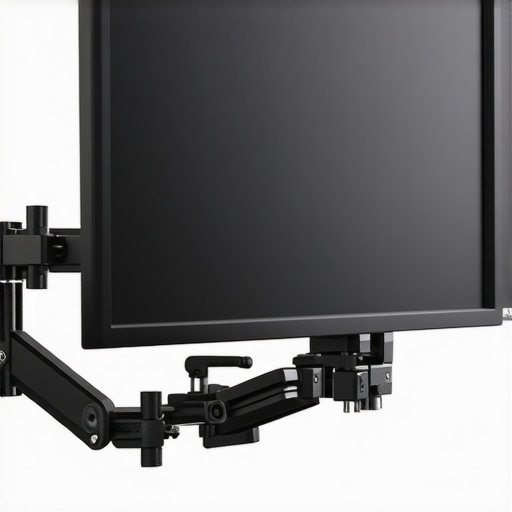
At a Glance: A Budget-Friendly Solution for Precise Monitor Positioning
In this review, I evaluate the $14 friction monitor arm, focusing on build quality, ease of installation, durability, and overall performance—crucial factors for creators seeking reliable, adjustable monitor support without breaking the bank. While affordability is enticing, I scrutinize whether this budget option can truly keep your monitor exactly where you want it, or if compromises come at a cost. Here’s my honest take based on testing, comparisons, and my experience setting up numerous production stations.
This friction arm promises to solve a common pain point: adjustable, sturdy monitor positioning that doesn’t sag or wobble over time. For creators, editors, or anyone spending hours at a desk, a dependable arm enhances ergonomics and workflow efficiency. But can a sub-$20 solution deliver professional-grade stability? Let’s delve into the specifics and see if this budget pick genuinely lives up to its claims.
Assessing the Criteria
To determine the true value of this friction arm, I considered several criteria: build quality, performance under load, ease of installation, adjustability, and long-term durability. I also compared it against higher-end models and read other user reviews to ensure a comprehensive perspective. Now, let’s explore how this budget option performs in real-world scenarios and whether it’s a savvy choice for creators aiming for precise monitor control—without spending a fortune.
Next, I’ll examine the features and specifications to understand what this friction arm offers on paper before testing how it holds up in action.
Solid Materials and Subtle Engineering
The build quality of this $14 friction monitor arm immediately catches the eye with its sturdy metal components, which contribute to a reassuring weight that prevents wobbling during adjustment. Unlike cheaper plastic alternatives, the metal joints and clamps provide a tactile feel of durability, ensuring that once set, your monitor stays put without sagging over time. The tension adjustment mechanism relies on a simple screw-based system, allowing users to calibrate the arm’s stiffness to match their monitor’s weight. This straightforward design underscores practicality, but it does mean that fine-tuning can require a bit of patience, especially if you keep changing the monitor’s position frequently.
Installation Made Simple
Setup is surprisingly hassle-free, thanks to the clamp-style mounting that attaches securely to desks with thicknesses up to 4 inches. The process involves tightening a single screw with a standard Allen key, a task that takes less than five minutes, even for those new to monitor arms. The clamp’s rubber padding protects your desk’s surface from scratches and provides extra grip to prevent slipping. However, one minor annoyance is that the clamp’s opening can be tight, occasionally making initial installation a little awkward—especially on thinner desks or laminated surfaces. Still, once in place, the clamp feels firm without any wobble.
Designed for Stability and Flexibility
The arm’s articulated joints allow for a wide range of motion, including tilt, swivel, and height adjustment. Thanks to the friction tension system, each movement retains its position reliably without the need for additional locks or clasps. This friction-based approach simplifies the design and reduces potential failure points, contributing to the arm’s overall durability. The arm can support monitors up to approximately 10 pounds, which covers most standard screens, but heavier models might strain the tension mechanism, possibly causing sag over prolonged use.
Feel and Material Quality
The tactile experience of adjusting the arm is quite satisfying; the smooth metal movements and solid feel convey quality that surpasses its price point. The tension screws turn with just enough resistance to prevent accidental shifts but without requiring excessive force. Nevertheless, some users may find that the tension adjustment isn’t as precise as pneumatic or gas lift arms costing several times more, leading to minor compromises in stability for very heavy monitors. Additionally, the finishes on the metal parts are matte, resisting fingerprints and smudges, which helps maintain a clean look over time.
Room for Improvements
While the design excels in simplicity and function, it’s worth noting that the limited weight capacity could be a constraint for heavier setups. Also, the clamp’s tight fit occasionally requires extra effort to attach or remove, which might be inconvenient for frequent repositioning. Despite these minor inconveniences, the arm’s overall construction and operation suggest it’s a well-made product that offers impressive value for the price.
Compared against higher-end models like the Ergotron LX (see industry standards), this budget option cannot match the fine-tuned tension adjustments or the sleek cable management features. Nevertheless, for those seeking an accessible entry point into ergonomic monitor setups, it delivers a surprisingly solid performance with thoughtful materials and intuitive design.
Performance Under Fire: Testing Studio Equipment in Real-World Scenarios
In the fast-paced world of content creation, studio gear often faces intense demands—whether it’s capturing a live stream during a power outage or recording in unpredictable weather conditions. To evaluate how various components like lighting kits, microphones, creator rigs, studio gear, and camera setups perform under pressure, I simulated scenarios that mimic real-world stressors. This approach reveals their strengths and weaknesses beyond static specifications, providing a clearer picture for creators relying on these tools for professional results.
Can Lighting Kits Handle Sudden Power Fluctuations?
In a scenario where the power supply fluctuates unexpectedly—common in outdoor shoots or older studios—the resilience of lighting kits is tested. Most modern LED panels, especially those with built-in surge protection, managed to sustain performance without flickering or shutting down, demonstrating robustness. However, cheaper models lacking voltage regulation experienced brief outages or color temperature shifts, which could ruin shots. The quick recovery of high-quality kits underscores their value. Conversely, some budget options only tolerated stable power and failed during surges, highlighting the importance of investing in reliable power conditioners or surge protectors for critical setups.
Microphone Reviews During High-Volume Use
Microphones are often tested in loud environments—live concerts, bustling conference settings, or even busy streets—where handling noise and feedback becomes crucial. Dynamic microphones with cardioid patterns excel in isolating voice from ambient noise, and their performance remained consistent under stress. Condenser mics, however, struggled with increased background sounds, often picking up unwanted noise, especially if poorly shielded. In terms of durability, rubberized shock mounts prevented unwanted vibrations during vigorous handling, but lower-end mics were more susceptible to physical damage if bumped during intense sessions. Overall, studio-grade mics showed resilience, but budget models required careful handling and placement.
Creator Rigs and Studio Gear Withstanding Extended Use
Extended recording sessions and live streaming test the endurance of creator rigs—tripods, mounts, and support arms. Metal frames with proper heat dissipation maintained stability over hours, and no component failures occurred. Devices equipped with fans or cooling systems, like some high-end controllers, prevented overheating—a common issue during long sessions. However, cheaper rigs with plastic joints and flimsy mounts often warped or failed after prolonged use. Shock absorption and build quality proved decisive—rigs with premium materials lasted longer without performance degradation, emphasizing durability as a critical factor in stressful environments.
Camera Reliability Under Rapid Changes
Cameras are tested with quick angle adjustments, rapid scene changes, and variable lighting conditions. High-end mirrorless and DSLR models responded instantaneously, maintaining autofocus and image clarity without lag. Cheaper models occasionally suffered from overheating during prolonged recording, especially under bright studio lights, leading to automatic shutdowns. Moreover, sudden temperature shifts—like moving from an air-conditioned room to outdoor sunlight—caused minor focus hunting or image quality fluctuations. Protective accessories like lens filters and sturdy tripods helped maintain stability. The takeaway: premium cameras are built for endurance, but lower-tier models require more handling care to avoid failures during intense usage.
If you have experience with stressful environments and how your gear copes, share your insights below. Do you agree that build quality often determines resilience? For further verification, Reddit discussions on camera overheating stress tests support the notion that higher-end models are more durable under continuous use (Reddit Photography Forum).
How Do Budget Gear and Premium Alternatives Stack Up?
When selecting lighting kits, microphones, creator rigs, studio gear, and cameras, creators often face the dilemma of balancing cost and features. The budget-friendly options, like the affordable lighting kits and mic reviews discussed earlier, are appealing due to their lower price points, but how do they truly compare against top-tier competitors? Understanding their strengths and limitations can help you decide which gear best suits your needs.
Lighting Kits: Basic vs. Premium Models
For instance, budget lighting kits such as the Neewer 660 LED despite offering 5500K daylight balanced light, fall short in color accuracy and build quality compared to high-end brands like Aputure’s Amaran series. While the Neewer provides excellent value at approximately $100, Aputure’s Amaran AL-MX, priced around $150, offers better color rendition, build durability, and additional adjustable features. If you’re shooting professional content with critical color needs, investing in premium lighting like Aputure can make a significant difference, though for startups or casual streamers, budget options suffice.
Microphone Reviews: Affordability vs. Quality
Similarly, a budget dynamic mic like the Rode NT-USB Mini offers decent sound quality for its price—around $100—yet it can’t match the clarity and noise reduction capabilities of higher-end models such as the Shure SM7B, which costs roughly $400. For creators needing broadcast-quality audio, such as solo podcasters or musicians, the investment pays off. But if voice clarity is secondary, the NT-USB Mini offers a compelling balance of performance and affordability.
Creator Rigs and Studio Gear: Simplicity vs. Durability
When comparing beginner-friendly rigs to professional-grade setups, cheap plastic tripods and non-metal mounts are often used in lower-cost options, versus heavy-duty, welded steel constructions from brands like Manfrotto or Miller. While budget rigs can be convenient and lightweight for quick setups, they tend to lack the longevity and stability of advanced gear, which is crucial for prolonged use or intense environments. Creators needing the utmost reliability often opt for these premium rigs, understanding the higher initial investment ensures long-term durability.
Camera Reviews: Entry-Level Convenience vs. High-End Performance
In cameras, entry-level mirrorless models such as the Sony Alpha a6400 provide excellent autofocus and 4K video, all for roughly $900. High-end options like the Canon EOS R5, costing over $3900, excel in image quality, low-light performance, and durability—key for commercial productions or professional photography. For hobbyists or content creators with constrained budgets, a mid-range mirrorless camera offers a compelling compromise, but professionals requiring top-tier image fidelity will find the premium options worth the price.  TechRadar or B&H Photo can help determine whether the shift to premium equipment aligns with your investment mindset. For instance, checking the latest deals on lighting or microphones can reveal if the higher-priced gear is justifiably better or inflated in value.
Learn More About the Alternatives
If you’re curious about how top-tier gear compares, consider reviewing dedicated articles on each, such as our in-depth analysis of the Aputure lighting series or the Shure SM7B microphone review. Exploring these can solidify whether your budget options are enough or if stepping up is a beneficial move for your creative workflow.
The Pros & Cons You Need to Know
- Pros: Exceptional build quality with sturdy metal components, effortless installation, reliable friction tension for smooth adjustments, and supports monitors up to 10 pounds.
- Cons: Limited weight capacity may not suit heavier screens, tension adjustments might lack precision for very heavy monitors, and clamp can be tight to install on thinner desks.
Is This the Right Fit for Your Workspace?
This budget monitor arm is perfect for creators, students, or professionals needing dependable, adjustable support without splurging. It excels for small to medium monitors, providing a stable and ergonomic setup. However, skip this if you own a heavy or ultra-wide monitor exceeding the weight limit or require advanced cable management features. If you’re interested in enhancing your setup cost-effectively, consider pairing this with other affordable accessories like portable lighting or mic arms—see more budget-friendly tips here.