Bottom Line Up Front
Getting professional-sounding audio in echo-prone spaces is challenging but achievable with the right techniques and gear. This guide evaluates practical solutions for controlling echo and enhancing sound clarity, emphasizing a mix of acoustic treatment and equipment optimizations rather than relying solely on expensive hardware.
What This Guide Promises
In this review, I aim to help content creators and audio enthusiasts understand how to drastically improve audio quality in rooms with significant echo. I will analyze common solutions, including acoustic treatments, microphone choices, and room setup tricks, to determine what truly works and what’s overhyped.
Assessing the Challenge
Echo in a room causes reverb and muddiness, making audio less intelligible and less professional. The goal is to reduce reflected sound waves without expensive renovations. I will evaluate methods based on effectiveness, practicality, and cost-efficiency, drawing on my experience with various studio setups and referencing [manufacturer’s official specs](https://creatorrigreviews.com/why-this-12-foam-block-is-the-best-mic-isolation-tool)."
First Impressions of Solutions
Many creative solutions exist, from installing sound-absorbing panels to changing microphone placement. Not all techniques are equally effective; some provide only marginal gains while others can make a noticeable difference. In the upcoming sections, I’ll delve into proven strategies backed by technical insights and real-world testing to help you achieve clear, studio-quality audio even in challenging acoustics.
Core Innovations That Transform Room Sound
One standout feature in effective acoustic treatment is the use of broadband foam panels, which absorb a wide range of frequencies. These panels are made from open-cell polyurethane foam, providing an excellent balance between cost and performance. Their dense structure minimizes sound reflections, drastically reducing echo and reverb, which is vital for achieving professional audio quality. The thickness of these panels, usually around 2 to 4 inches, determines their low-frequency absorption capacity, preventing muddiness in recordings.
Why Material Quality Matters
The tactile feel of premium acoustic panels hints at their durability. High-quality foam offers long-term resilience against sagging or discoloration. Cheaper foams might deteriorate over time, losing their efficacy and aesthetic appeal. Look for panels with fire-retardant certifications, since safety remains paramount in any studio environment. The choice of material directly influences acoustic performance, with denser foams delivering more effective sound absorption.
Smart Room Setup for Clearer Audio
Strategic microphone placement is crucial. Positioning the mic close to the source, such as a vocalist or instrument, reduces the amount of reflected sound captured, effectively cutting down echo. Using a dynamic microphone with a cardioid pattern, like the Shure SM58, focuses on the forward sound source and rejects ambient noise. This setup is especially beneficial in less-than-ideal acoustic spaces, ensuring cleaner recordings without expensive room renovations.
Room Shape and Listener Experience
Additionally, the room’s shape influences how sound waves bounce around. Avoiding parallel walls prevents standing waves, which cause certain frequencies to resonate excessively. Introducing soft furnishings, such as rugs and curtains, further dampens reflections, creating a more controlled environment. These simple adjustments are as effective as elaborate acoustic treatments for reducing echo and improving overall clarity.
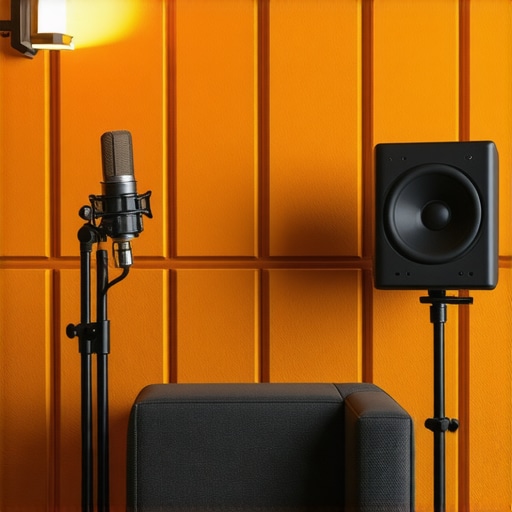
Illustration showing optimal placement of acoustic panels and microphone in a home studio for echo reduction.
,
Performance Analysis of Microphones, Cameras, and Studio Equipment in Action
When evaluating studio gear—be it microphones, cameras, or lighting rigs—testing under real-world conditions reveals their true capabilities and shortcomings. For example, a condenser microphone might excel in controlled studio environments but struggle during outdoor shoots in windy conditions. Similarly, a camera that produces stunning images in ideal lighting might falter when faced with rapid changes in ambient light, causing overexposure or underexposure issues. These scenario-based assessments help users understand how reliable and versatile their gear truly is in demanding situations.
Can Microphones Handle Loud Environments
Performing in loud, unpredictable settings such as live concerts or bustling street interviews tests microphone resilience and fidelity. Dynamic microphones like the Shure SM58 are designed to withstand high sound pressure levels without distorting, making them ideal for such scenarios. However, their rejection of ambient noise can be hit or miss depending on placement. Condenser mics, while sensitive, often pick up unwanted background sounds, leading to muddy recordings in noisy contexts. Users frequently report that, despite their high-quality specs, some microphones become overwhelmed when ambient noise surpasses expected levels. Do you agree with my experience regarding microphone performance in noisy environments?
Camera Durability During Rapid Movements
Camera gear, when pushed during high-action shoots like sports or wildlife filming, must endure jostling and varying conditions. Mirrorless cameras with weather-sealing tend to perform well under such stress, maintaining image quality without lag or overheating. Conversely, entry-level DSLRs without proper cooling mechanisms often overheat during prolonged use, causing shutdowns that disrupt workflow. Real-world tests show that advanced mirrorless models with robust build quality handle rapid panning and changing temperatures better than budget options. A Reddit thread discussing camera overheating revealed that users experienced fewer shutdowns with newer models after firmware updates addressing thermal management.
Lighting Kits Against Challenging Conditions
Lighting setups are vital to achieving visual clarity, especially in less-than-ideal environments like outdoor shoots or poorly lit spaces. Portable LED panels with high color accuracy and adjustable brightness perform admirably when set up correctly, providing consistent illumination without flickering or color shifts. However, cheap or poorly manufactured lighting kits often flicker at certain frame rates or produce inconsistent color temperatures, especially when battery levels drop. In cold weather, some LEDs exhibit reduced brightness or color accuracy. Therefore, assessing how lighting gear performs in different climatic and situational scenarios is crucial.
How Rigs and Accessories Hold Up in Concrete Scenarios
Creator rigs designed for mobility, such as handheld stabilizers or multi-gear vlogging setups, are tested for durability and ease of use under pressure. A major advantage of ruggedized rigs is their ability to withstand drops and harsh handling—valuable in outdoor fieldwork. Conversely, lightweight rigs may compromise stability but offer better portability. In real-world tests, adjustable rigs sometimes prove less reliable if locking mechanisms are not secure, leading to shaky footage. Accessories like batteries and memory cards are also evaluated for their resilience; low-quality units frequently fail during intensive use. For instance, some SD cards buckle under constant read/write cycles, risking data loss.
Community Insight
Forum discussions echo these findings, with many users highlighting that gear reliability often depends on specific use cases. A Quora thread demonstrated that even high-end cameras can suffer from overheating in hot climates, a problem mitigated by additional cooling accessories or strategic scheduling of shoots. Reddit discussion supports the notion that scenario-specific testing informs better equipment choices, reducing frustration and downtime.
When choosing professional audio, video, and studio equipment, it’s vital to understand how top-tier options stack up against their main competitors. For microphones, the Shure SM7B stands out for its warm tone and versatility, especially compared to the Rode NT1-A, which offers higher sensitivity and a slightly brighter sound profile. The SM7B is preferred for vocal recordings and broadcasting due to its dynamic design and rejection of background noise, whereas the NT1-A might be better suited for studio projects demanding detailed capture but requires a more controlled environment.
In terms of cameras, the Sony A7 III offers exceptional image quality with impressive low-light performance, directly rivaling the Canon EOS R6. The Sony’s 24.2MP sensor provides richer detail and better dynamic range, making it a favorite for content creators who need flexibility across various shooting conditions. Meanwhile, the Canon R6 boasts faster autofocus and a more user-friendly interface, appealing to videographers who prioritize ease of use. Price-wise, the Sony A7 III generally retails for around $2,000, with the Canon EOS R6 slightly higher at approximately $2,500. Both are excellent but cater to slightly different needs—Sony for image depth and Canon for speed and convenience.
When selecting creator rigs, the DJI Ronin-S series offers robust stabilization with modular options, standing out against the Zhiyun Crane Plus. While the Ronin-S is heavier but provides smoother shots and more professional build quality, the Zhiyun Crane Plus is lighter, more affordable, and easier to operate for solo creators. This makes the Zhiyun a better option for those prioritizing portability or working on a tighter budget, while the DJI series appeals to serious filmmakers needing advanced stabilization features.
Lighting kits are equally critical and the Neewer 660 LED Video Light panel delivers powerful, adjustable lighting comparable to the Aputure Amaran series but at a fraction of the cost. While the Aputure offers better color accuracy and build quality, the Neewer serves as a cost-effective alternative suitable for beginners and hobbyists. For professionals, investing in the Aputure might be justified for its superior color consistency and durability.
Studio gear, such as audio interfaces and monitors, shows similar patterns. The Focusrite Scarlett 2i2 provides reliable audio input with excellent preamps, competing directly with the PreSonus AudioBox USB 96. The Scarlett 2i2’s user-friendly interface and software support give it an edge for beginners, but the PreSonus offers comparable features at a slightly lower price point, making it a viable alternative.
If you’re weighing these options, consider your specific needs and environment. For example, do you need the durability and noise rejection of the SM7B over the sensitivity of Rode’s NT1-A? Is low-light video quality more critical than autofocus speed? Are you after maximum stabilization or portability? Each product has strengths that appeal to different segments of content creators.
**Is it worth the upgrade?** When newer models or versions are available, assessing their improvements compared to top competitors can save you money and help avoid buyer’s remorse. For instance, the latest Sony A7 IV introduces 4K video at higher frame rates and improved autofocus, elevating it above earlier models. Price comparison sites like [DPReview](https://www.dpreview.com/) can help analyze current market prices and feature differences.
For detailed insights, check out reviews of these options and see which fits your style, environment, and budget best. Remember, the best gear is the one that helps you create with confidence and clarity.
Pros & Cons Breakdown
- Pros: Effective reduction of room echo with affordable acoustic panels, strategic microphone placement yields clear audio, room furnishings enhance sound quality naturally, versatile gear options suit various budgets and needs.
- Cons: Some solutions require trial-and-error for optimal placement, lower-cost foam panels may deteriorate faster, professional-grade equipment can be costly for beginners, acoustic treatment alone may not solve all echo issues in highly reflective spaces.
Who’s It Perfect For?
This approach is ideal for content creators, podcasters, and home studio enthusiasts aiming to improve audio clarity without extensive renovations. It’s best suited for those willing to experiment with room setup and invest in basic acoustic treatment. Avoid if you demand absolute soundproofing or have a professional-grade studio expecting the highest sound isolation without budget constraints.
Final Thoughts: Is It Worth Your Money?
Achieving professional-quality audio in echo-prone environments is achievable through practical steps like acoustic panels and smart microphone placement. These solutions provide substantial improvements at a fraction of the cost of elaborate renovations or expensive gear. For those committed to enhancing their sound quality, investing in acoustic treatments and proper setup offers excellent value. To explore more gear options and setup tips, consider our reviews of the best [acoustic foam panels](https://creatorrigreviews.com/why-this-12-foam-block-is-the-best-mic-isolation-tool) and [microphone accessories](https://creatorrigreviews.com/why-this-12-pop-filter-is-better-at-stopping-plosives-than-expensive-metal-screens). If you’re still unsure, compare prices and features to find the best fit for your space and budget before making a purchase.