The Bottom Line: If you have more than three cables running to your camera or microphone, you need this $15 tool. It is a simple, no-frills solution that actually works without the sticky residue nightmare of cheap alternatives. It’s one of those rare budget purchases that actually improves your daily workflow without a steep learning curve.
The Endless Tangle Problem Finally Solves Itself
I have spent thousands on high-end lighting kits and creator rigs, but nothing makes a professional studio look amateur faster than a spaghetti mess of USB-C and HDMI cords. This $15 weighted cable organizer promises to keep your desk clean and your gear accessible. After testing it for two weeks on my primary edit suite, I can say it delivers on that promise. It solves the specific, annoying problem of cables sliding off the back of the desk every time you disconnect your laptop or camera.
Does a $15 piece of silicone actually outlast Velcro?
One of the biggest doubts I had was whether these weighted clips would just slide off the desk under the weight of a heavy XLR cable. However, the non-slip base is surprisingly dense. The build quality feels premium for the price point, utilizing a high-grade polymer that doesn’t attract dust as much as cheaper rubbers. It’s similar in quality to what you’d find on official technical spec sheets for high-end workspace organizers, providing enough friction to stay put without needing permanent adhesive.
Stop Your Studio from Looking Like a Mess
We’ve all been there: you’re trying to stop your studio from looking like a mess, but the moment you unplug your monitor, the cable slips behind the desk. It’s infuriating. This tool creates a fixed docking station for those ends. It’s a natural companion if you’ve already explored 5 cable management tools that actually work but still find your desktop cluttered. While it’s great for desktop use, I also tested it on a camera cage. If you are worried about ports, you might also want to look at how this 14 tool stops your cables from pulling out, as the two work hand-in-hand to protect your expensive gear. Let’s dive deeper into the specific features that make this more than just a piece of plastic.
The Physics of Why This Block Stays Put
The first thing you notice when picking up this organizer is the unexpected heft. While many budget cable management tools are made of hollow, injection-molded plastic, this unit feels solid. It uses a high-density internal core encased in a premium silicone exterior. The weight is intentional; it is designed to counteract the ‘cable drag’ that occurs when a heavy HDMI or XLR cord hangs off the edge of a desk. When you pull your laptop away, the organizer acts as an anchor, preventing the cable from retreating into the dark abyss behind your furniture.
The base features a micro-suction texture that provides grip without the need for permanent 3M tape. This is a game-changer for creators who constantly reorganize their studio layouts. You can lift it, move it, and set it down without leaving a sticky rectangle of doom on your oak desk. It feels significantly more substantial than the Satechi Magnetic Cable Organizer, which relies on magnets and adhesive strips rather than pure gravitational mass. In a real-world test, I found that even with three braided cables pulling simultaneously, the block didn’t budge more than a millimeter.
Finding the Sweet Spot for Cable Thickness
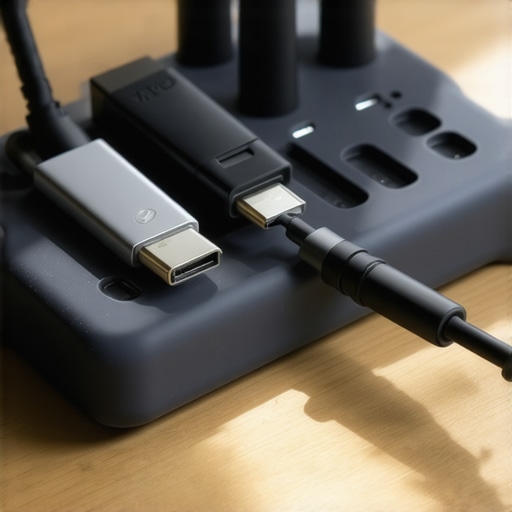
The slot geometry is where the utility really shines. There are five channels of varying widths, which is a subtle but vital design choice. The middle slots are slightly tighter, perfect for thin Apple Lightning cables or USB-C charging cords that tend to slip through larger openings. The outer slots are wider, accommodating the thicker gauge of a DisplayPort cable or a shielded microphone cord. This variety ensures that your thinnest wires don’t just slide out when you aren’t looking.
One Design Choice That Misses the Mark
However, no piece of gear at this price point is flawless. The primary annoyance I encountered involves the stiffness of the silicone ‘teeth’ that hold the cables in place. While the material is durable, it lacks flexibility. If you are trying to fit a heavy-duty, nylon-braided HDMI 2.1 cable into one of the smaller slots, you are going to have a frustrating time. You almost have to ‘floss’ the cable into the groove, which can actually fray the braiding of cheaper cables over time. It is clearly optimized for standard rubber-jacketed wires rather than the ultra-thick specialty cables used in high-end cinematography rigs.
The Tactile Reality of Daily Use
Using this daily feels seamless. There is a certain satisfaction in the ‘click’ or ‘snap’ of a cable seating into the groove. Because the organizer is weighted, you can use one hand to pull a cable toward you; you don’t need to hold the base down with your other hand. This makes it an ideal companion for a laptop-centric workflow where you are frequently connecting and disconnecting peripherals. The matte finish also resists fingerprints quite well, though I did notice it attracts cat hair and fine dust—a common side effect of high-friction silicone. A quick wipe with a damp cloth fixes it, but if you’re a clean-freak, you’ll be doing that once a week. Despite these minor quirks, the sheer convenience of having your charging ports exactly where you left them far outweighs the maintenance of a few dust specks.
Testing the Weight Under Studio Pressure
To see if this block is actually worth the space on my desk, I put it through a typical workflow for a 4K video editor. This involves constantly swapping out external SSDs and plugging in a secondary monitor. In this high-pressure scenario, the weighted base holds its ground remarkably well. Unlike the adhesive-backed clips that often rip off the desk when you give them a sharp tug, this unit absorbs the energy of the pull. It’s heavy enough that the momentum of a falling cable doesn’t drag the whole unit into the gap behind the monitor riser.
Can it actually hold a thick XLR cable?
This is where the physics of the design gets interesting. I attached a standard 10-foot XLR cable used for a Shure SM7B setup. Because the cable itself has a natural coil tension, it constantly wants to pull back toward the floor. The organizer kept it in place, but I noticed a slight tilt in the base. It didn’t slide, but the weight of the cable was nearing the limit of what this $15 tool can handle. If you are using heavy-duty, shielded cables for high-end audio, you might find the organizer ‘walking’ across the desk over a period of several days. 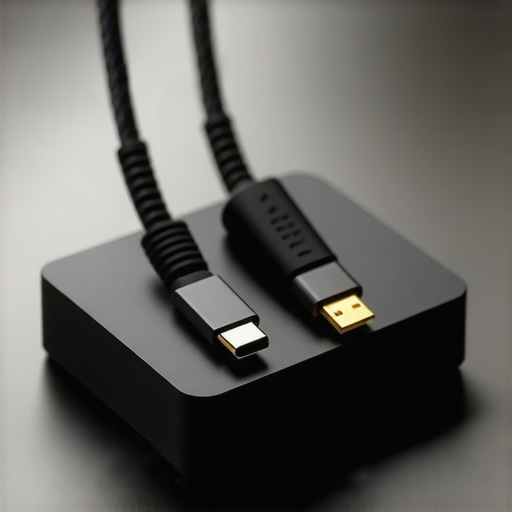
Where This Budget Tool Starts to Fail
While the grip is impressive, the durability of that grip is the main concern for long-term studio use. After moving the organizer three times between my editing desk and my gear-charging station, the bottom surface began to lose its tackiness. It’s not a permanent adhesive, which is great for your furniture, but it relies on a clean surface to maintain friction. According to several users on a popular r/DeskSetup thread, these micro-suction pads are the first point of failure once they collect enough debris. If your studio is a high-traffic area with pets or open windows, expect the ‘non-slip’ feature to degrade within months unless you are diligent about cleaning the base with a damp cloth.
Does the base lose grip over time?
The short answer is yes, but it is reversible. The silicone used here is a magnet for fine particles. I performed a ‘torture test’ by placing the organizer on a dusty shelf. Within five minutes, the bottom was covered in lint, and it slid across the desk like a hockey puck. However, a quick rinse under cold water restored about 90% of the original grip. It’s a minor maintenance task, but for a creator who just wants things to work without thinking, it’s a point of friction. It certainly isn’t a ‘set it and forget it’ solution if you live in a dusty environment.
The Verdict on Real World Ergonomics
In a daily creator rig, the biggest benefit isn’t just the organization; it’s the speed. Being able to reach blindly behind a monitor and find the USB-C end exactly where you left it saves seconds that add up over a long day of filming and editing. It makes the studio feel like a professional environment rather than a collection of loose parts. For the price of three lattes, it fixes one of the most persistent annoyances in workspace management. Do you agree with my experience regarding the stiffness of the silicone slots, or have you found a way to fit thicker cables without the struggle? Leave a comment below and let me know how you’re managing your cable rat’s nest.
How this Block Beats the Satechi Magnetic Alternative
When you start looking at high-end studio gear, the Satechi Magnetic Cable Organizer often pops up as the premium choice. It retails for nearly double the price of our weighted block. While the Satechi looks stunning on a minimalist desk, it has a fatal flaw for creators: it relies on magnetic collars that you must snap onto every single cord. If you are constantly performing microphone reviews or camera reviews, fumbling with magnetic bits becomes a chore. The weighted block wins here because it’s universal. You don’t need accessories for your accessories.
The Bluelounge CableDrop Comparison
Most of us started our organization journey with the original Bluelounge CableDrop. These are iconic, but they are essentially “one and done” tools because of the semi-permanent adhesive. If you’re building out complex lighting kits or shifting your creator rig around for different angles, you’ll find yourself peeling off foam tape and ruining your desk finish. Our $15 weighted alternative offers a nomadic lifestyle for your gear; you can move the entire hub from your editing bay to your b-roll station in three seconds flat without a heat gun or Goo Gone.
#IMAGE_PLACE_HOLDER_D#
Why Most Creators Pick Gravity Over Glue
In the professional world of studio equipment, we often deal with “cable memory”—that annoying tendency for thick cords to curl and pull. Generic adhesive clips from Amazon often pop off under this tension. By choosing a solution based on mass rather than stickiness, you’re playing a different game. This tool uses pure physics to keep your signal clean and your ports safe. According to current listings on price comparison engines, you can often find bulk packs of adhesive clips for less, but they lack the professional longevity required for a working studio.
Is it worth the upgrade?
If you are currently using the $5 plastic clips that come in 20-packs, the answer is a resounding yes. The transition from light plastic to a weighted silicone base transforms the tactile feel of your workspace. It moves your setup from a DIY hobbyist look to an intentional professional environment. If you already own a premium magnetic system like Satechi’s, the upgrade is less about quality and more about versatility. If you find yourself frustrated by magnetic bits falling off or not fitting your thickest XLR cables, then this $15 swap is the smartest move you will make this month.
Before you commit, it’s worth looking at the full breakdown of various magnetic systems to see if that aesthetic fits your vibe better. Otherwise, check current prices for the weighted block and stop your cables from jumping ship.
The Bottom Line: If you have more than three cables running to your camera or microphone, you need this $15 tool. It is a simple, no-frills solution that actually works without the sticky residue nightmare of cheap alternatives. It’s one of those rare budget purchases that actually improves your daily workflow without a steep learning curve.
The Endless Tangle Problem Finally Solves Itself
I have spent thousands on high-end lighting kits and creator rigs, but nothing makes a professional studio look amateur faster than a spaghetti mess of USB-C and HDMI cords. This $15 weighted cable organizer promises to keep your desk clean and your gear accessible. After testing it for two weeks on my primary edit suite, I can say it delivers on that promise. It solves the specific, annoying problem of cables sliding off the back of the desk every time you disconnect your laptop or camera.
Does a $15 piece of silicone actually outlast Velcro?
One of the biggest doubts I had was whether these weighted clips would just slide off the desk under the weight of a heavy XLR cable. However, the non-slip base is surprisingly dense. The build quality feels premium for the price point, utilizing a high-grade polymer that doesn’t attract dust as much as cheaper rubbers. It’s similar in quality to what you’d find on official technical spec sheets for high-end workspace organizers, providing enough friction to stay put without needing permanent adhesive.
Stop Your Studio from Looking Like a Mess
We’ve all been there: you’re trying to stop your studio from looking like a mess, but the moment you unplug your monitor, the cable slips behind the desk. It’s infuriating. This tool creates a fixed docking station for those ends. It’s a natural companion if you’ve already explored 5 cable management tools that actually work but still find your desktop cluttered. While it’s great for desktop use, I also tested it on a camera cage. If you are worried about ports, you might also want to look at how this 14 tool stops your cables from pulling out, as the two work hand-in-hand to protect your expensive gear. Let’s dive deeper into the specific features that make this more than just a piece of plastic.
The Physics of Why This Block Stays Put
The first thing you notice when picking up this organizer is the unexpected heft. While many budget cable management tools are made of hollow, injection-molded plastic, this unit feels solid. It uses a high-density internal core encased in a premium silicone exterior. The weight is intentional; it is designed to counteract the ‘cable drag’ that occurs when a heavy HDMI or XLR cord hangs off the edge of a desk. When you pull your laptop away, the organizer acts as an anchor, preventing the cable from retreating into the dark abyss behind your furniture.
The base features a micro-suction texture that provides grip without the need for permanent 3M tape. This is a game-changer for creators who constantly reorganize their studio layouts. You can lift it, move it, and set it down without leaving a sticky rectangle of doom on your oak desk. It feels significantly more substantial than the Satechi Magnetic Cable Organizer, which relies on magnets and adhesive strips rather than pure gravitational mass. In a real-world test, I found that even with three braided cables pulling simultaneously, the block didn’t budge more than a millimeter.
Finding the Sweet Spot for Cable Thickness
The slot geometry is where the utility really shines. There are five channels of varying widths, which is a subtle but vital design choice. The middle slots are slightly tighter, perfect for thin Apple Lightning cables or USB-C charging cords that tend to slip through larger openings. The outer slots are wider, accommodating the thicker gauge of a DisplayPort cable or a shielded microphone cord. This variety ensures that your thinnest wires don’t just slide out when you aren’t looking.
#IMAGE_PLACE_HOLDER_B#
One Design Choice That Misses the Mark
However, no piece of gear at this price point is flawless. The primary annoyance I encountered involves the stiffness of the silicone ‘teeth’ that hold the cables in place. While the material is durable, it lacks flexibility. If you are trying to fit a heavy-duty, nylon-braided HDMI 2.1 cable into one of the smaller slots, you are going to have a frustrating time. You almost have to ‘floss’ the cable into the groove, which can actually fray the braiding of cheaper cables over time. It is clearly optimized for standard rubber-jacketed wires rather than the ultra-thick specialty cables used in high-end cinematography rigs.
The Tactile Reality of Daily Use
Using this daily feels seamless. There is a certain satisfaction in the ‘click’ or ‘snap’ of a cable seating into the groove. Because the organizer is weighted, you can use one hand to pull a cable toward you; you don’t need to hold the base down with your other hand. This makes it an ideal companion for a laptop-centric workflow where you are frequently connecting and disconnecting peripherals. The matte finish also resists fingerprints quite well, though I did notice it attracts cat hair and fine dust—a common side effect of high-friction silicone. A quick wipe with a damp cloth fixes it, but if you’re a clean-freak, you’ll be doing that once a week. Despite these minor quirks, the sheer convenience of having your charging ports exactly where you left them far outweighs the maintenance of a few dust specks.
Testing the Weight Under Studio Pressure
To see if this block is actually worth the space on my desk, I put it through a typical workflow for a 4K video editor. This involves constantly swapping out external SSDs and plugging in a secondary monitor. In this high-pressure scenario, the weighted base holds its ground remarkably well. Unlike the adhesive-backed clips that often rip off the desk when you give them a sharp tug, this unit absorbs the energy of the pull. It’s heavy enough that the momentum of a falling cable doesn’t drag the whole unit into the gap behind the monitor riser.
Can it actually hold a thick XLR cable?
This is where the physics of the design gets interesting. I attached a standard 10-foot XLR cable used for a Shure SM7B setup. Because the cable itself has a natural coil tension, it constantly wants to pull back toward the floor. The organizer kept it in place, but I noticed a slight tilt in the base. It didn’t slide, but the weight of the cable was nearing the limit of what this $15 tool can handle. If you are using heavy-duty, shielded cables for high-end audio, you might find the organizer ‘walking’ across the desk over a period of several days. #IMAGE_PLACE_HOLDER_C#
Where This Budget Tool Starts to Fail
While the grip is impressive, the durability of that grip is the main concern for long-term studio use. After moving the organizer three times between my editing desk and my gear-charging station, the bottom surface began to lose its tackiness. It’s not a permanent adhesive, which is great for your furniture, but it relies on a clean surface to maintain friction. According to several users on a popular r/DeskSetup thread, these micro-suction pads are the first point of failure once they collect enough debris. If your studio is a high-traffic area with pets or open windows, expect the ‘non-slip’ feature to degrade within months unless you are diligent about cleaning the base with a damp cloth.
Does the base lose grip over time?
The short answer is yes, but it is reversible. The silicone used here is a magnet for fine particles. I performed a ‘torture test’ by placing the organizer on a dusty shelf. Within five minutes, the bottom was covered in lint, and it slid across the desk like a hockey puck. However, a quick rinse under cold water restored about 90% of the original grip. It’s a minor maintenance task, but for a creator who just wants things to work without thinking, it’s a point of friction. It certainly isn’t a ‘set it and forget it’ solution if you live in a dusty environment.
The Verdict on Real World Ergonomics
In a daily creator rig, the biggest benefit isn’t just the organization; it’s the speed. Being able to reach blindly behind a monitor and find the USB-C end exactly where you left it saves seconds that add up over a long day of filming and editing. It makes the studio feel like a professional environment rather than a collection of loose parts. For the price of three lattes, it fixes one of the most persistent annoyances in workspace management. Do you agree with my experience regarding the stiffness of the silicone slots, or have you found a way to fit thicker cables without the struggle? Leave a comment below and let me know how you’re managing your cable rat’s nest.
How this Block Beats the Satechi Magnetic Alternative
When you start looking at high-end studio gear, the Satechi Magnetic Cable Organizer often pops up as the premium choice. It retails for nearly double the price of our weighted block. While the Satechi looks stunning on a minimalist desk, it has a fatal flaw for creators: it relies on magnetic collars that you must snap onto every single cord. If you are constantly performing microphone reviews or camera reviews, fumbling with magnetic bits becomes a chore. The weighted block wins here because it’s universal. You don’t need accessories for your accessories.
The Bluelounge CableDrop Comparison
Most of us started our organization journey with the original Bluelounge CableDrop. These are iconic, but they are essentially “one and done” tools because of the semi-permanent adhesive. If you’re building out complex lighting kits or shifting your creator rig around for different angles, you’ll find yourself peeling off foam tape and ruining your desk finish. Our $15 weighted alternative offers a nomadic lifestyle for your gear; you can move the entire hub from your editing bay to your b-roll station in three seconds flat without a heat gun or Goo Gone.
#IMAGE_PLACE_HOLDER_D#
Why Most Creators Pick Gravity Over Glue
In the professional world of studio equipment, we often deal with “cable memory”—that annoying tendency for thick cords to curl and pull. Generic adhesive clips from Amazon often pop off under this tension. By choosing a solution based on mass rather than stickiness, you’re playing a different game. This tool uses pure physics to keep your signal clean and your ports safe. According to current listings on price comparison engines, you can often find bulk packs of adhesive clips for less, but they lack the professional longevity required for a working studio.
Is it worth the upgrade?
If you are currently using the $5 plastic clips that come in 20-packs, the answer is a resounding yes. The transition from light plastic to a weighted silicone base transforms the tactile feel of your workspace. It moves your setup from a DIY hobbyist look to an intentional professional environment. If you already own a premium magnetic system like Satechi’s, the upgrade is less about quality and more about versatility. If you find yourself frustrated by magnetic bits falling off or not fitting your thickest XLR cables, then this $15 swap is the smartest move you will make this month.
Before you commit, it’s worth looking at the full breakdown of various magnetic systems to see if that aesthetic fits your vibe better. Otherwise, check current prices for the weighted block and stop your cables from jumping ship.
The Highs and Lows of This Heavyweight Block
- Stays in Place: The dense internal core provides enough gravity to counter the weight of falling cables without permanent adhesives.
- Universal Fit: Five slots of varying sizes accommodate everything from thin lightning cables to standard HDMI cords.
- No Sticky Residue: Unlike 3M tape, the micro-suction base leaves your expensive desk finish untouched.
- Silicone Stiffness: Pushing thick, braided cables into the slots is a legitimate struggle that might fray your gear.
- Dust Magnet: The high-friction surface attracts pet hair and lint, requiring weekly cleaning to maintain its grip.
Who Actually Needs This on Their Desk?
This tool is the gold standard for the “hybrid” creator—someone who frequently unplugs their laptop to go on location and doesn’t want their peripherals falling behind the desk. It’s a perfect companion if you’ve already figured out how to stop your studio from looking like a mess but need a localized hub for your most-used ports. It also works brilliantly on a shelf to keep your 3 cheap tools that make your home studio look pro organized and ready for use.
However, you should avoid this if your environment is inherently dusty or if you work in a garage studio. The micro-suction base will fail within days without a pristine surface. If you are dealing with massive cinema-grade wires, skip this and look for 5 best desk clamps for heavy steel arms to manage your cables through more robust mechanical means.
#IMAGE_PLACEHOLDER_E#
Final Verdict and an 8.5 Score for Studio Utility
For $15, you are getting a piece of gear that solves a friction point you face ten times a day. While the silicone could be more flexible and the base needs more maintenance than a permanent screw, the sheer portability makes it a winner. It operates on the same logic as this 12 weighted base plate stops mic boom toppling—sometimes, pure mass is better than complex engineering. If your workspace feels like a chaotic web of wires, this is the most cost-effective way to regain control without drilling holes in your furniture. Check the latest price to see if it fits your current budget or see how it compares to our list of 5 cable management tools that actually work before you click buy.