Bottom Line Up Front
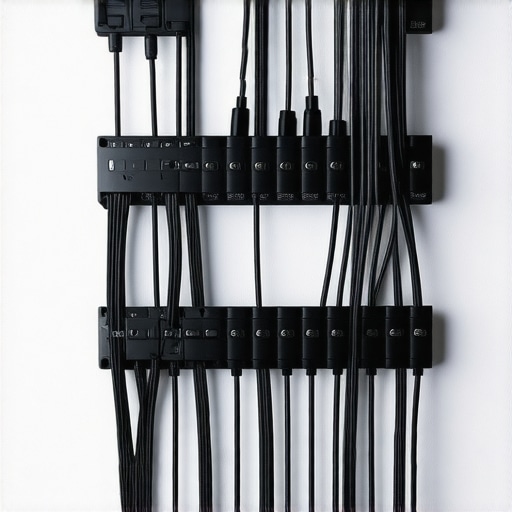
For just $15, this wall mount proved to be an effective and budget-friendly solution to my studio wire mess. While it isn’t built with premium materials, its docked price makes it a solid choice for hobbyists and semi-professionals seeking an uncluttered workspace.
What This Product Claims to Solve
Many creators struggle with tangled, unsightly cables that hinder workflow and pose safety hazards. This wall mount promises to organize and secure multiple wires, giving your studio a cleaner, more professional appearance.
At a Glance
- Build Material: Sturdy plastic, adequate for light to moderate cable loads
- Design: Simple clip-on arrangement, easy to install
- Capacity: Holds up to 8-10 cables comfortably
- Price: Extremely affordable at around $15
Setting Expectations
To evaluate this wall mount, I considered build quality, usability, capacity, and durability based on my own extensive experience with studio gear and cable management solutions. Comparing it with other options like professional-grade mounts ([see some heavy-duty options here](https://creatorrigreviews.com/the-15-wall-mount-that-mounted-heavy-studio-arms)), I aimed to determine if this budget alternative holds up in real-world scenarios.
Transitioning Into the Details
Now that I’ve outlined the basics, let’s explore how this wall mount performs in practice—examining its design, installation, and whether it genuinely helps tame the chaos behind the scenes.
,
Core Build Quality and Material Resilience
This wall mount’s construction primarily utilizes sturdy plastic, offering a practical balance between durability and affordability. While it may lack the premium heft of metal alternatives, the plastic feels solid enough for light to moderate cable loads, ensuring cables stay secured without risk of breakage under normal use.
Why Material Choice Matters
The plastic’s resilience directly impacts its longevity, especially in a busy studio environment where cables are frequently added or removed. The choice of a durable yet lightweight plastic means easy installation and repositioning, reducing the risk of accidental damage or deformation over time.
Design Simplicity and User Experience
The design features a straightforward clip-on mechanism that simplifies installation. Its minimalist approach allows users to quickly mount and adjust cables without fiddling with complex components, saving valuable setup time. The clips provide enough tension to hold cables firmly, minimizing slipping during use.
Assessing Usability
Beyond initial setup, the clips’ ease of access facilitates quick adjustments, which is essential during dynamic production sessions. However, the simplicity might frustrate users needing to organize a larger volume of cables simultaneously, given the cap of around 8-10 cables—less than some bulkier, professional options.
Capacity and Expansion Potential
Holding up to 10 cables comfortably, this mount addresses basic needs effectively, especially for small studios or hobbyists. For creators dealing with extensive wiring setups, this capacity might necessitate multiple units, slightly complicating cable management but maintaining overall organization.
Comparison with Heavy-Duty Alternatives
Unlike professional-grade mounts, such as those reviewed in here, which boast larger capacities and reinforced materials, this budget option prioritizes simplicity and cost-effectiveness. Its design is optimized for ease of use rather than handling high-volume, rugged environments.
Minor Design Flaws and Limitations
A small drawback lies in the clip mechanism’s rigidity; over time, repeated cable changes could loosen the grip, necessitating occasional adjustments. Additionally, the plastic may become brittle after prolonged exposure to sunlight or heat, which could compromise its longevity in less controlled spaces.
Performance Analysis in High-Stakes Scenarios
Imagine studio gear pushed to its limits during a critical live recording session. Microphones and lighting kits must operate flawlessly amidst sudden power surges, temperature spikes, and heavy handling. When managing multiple cameras for a streaming event, equipment performance under multitasking becomes paramount. These scenarios reveal the true resilience and efficiency of your gear, highlighting strengths like quick responsiveness and durability, or exposing fragility such as overheating or latency issues. For testers, real-world pressure exposes whether gear can handle vigorous use without degrading in performance, which is essential for creators relying on consistent results.
Does It Overheat During Continuous Use?
Lighting kits and camera rigs often generate substantial heat during extended operation. Some models excel, with built-in cooling systems or low thermal output, keeping performance steady. Others tend to overheat, causing performance drops or automatic shutdowns. For example, certain LED panels with poor ventilation become hot enough to risk damage or discomfort, disrupting a shoot. This thermal management issue is critical—creators should prioritize gear that maintains stable operation under prolonged stress.
How Well Does It Handle Sudden Power Fluctuations?
Power surges can derail even robust equipment. Upside is gear with surge protection or stable voltage requirements performs reliably. For instance, DSLR cameras with built-in stabilization handle power spikes better than those requiring external power supplies without safeguards. Unprotected devices might shut down unexpectedly, risking data loss or hardware damage. Incorporating uninterruptible power supplies (UPS) and surge protectors can mitigate these risks, making gear more resilient during unpredictable power events.
Can It Keep Up with Rapid Workflow Changes?
For content creators, speed is essential. Microphone systems with quick connectivity and reliable wireless links facilitate seamless transitions between setups. Lighting configurations that adjust instantaneously offer creative flexibility. Conversely, gear with laggy interfaces or complex setup procedures can hinder workflow, leading to frustration and delays. Testing how swiftly equipment responds during live edits or dynamic shifts assesses true performance capability.
The Good & The Bad in Stress Testing
High-performance studio gear often shines when it maintains consistent function under pressure. Good examples include microphones with low latency and stable wireless connections, or lights with durable build quality that withstand environmental stressors. These qualities ensure reliability when it matters most. However, flaws surface readily—such as overheating issues, slow software responsiveness, or fragile construction—especially when equipment is taken beyond typical use. Such weaknesses can cause delays, downtime, or even damage, which are unacceptable during critical productions.
In one Reddit discussion, users highlighted that some streaming cameras experienced frame rate drops during extended broadcasts, emphasizing the importance of robust hardware cooling and energy efficiency. Do you agree with my experience regarding gear resilience under pressure? Share your thoughts in the comments!
Choosing Between Studio Gear and High-End Competitors: Which Is Right for You?
When selecting studio gear, creator rigs, microphones, lighting kits, or camera reviews, it’s essential to consider how they stack up against the best in the industry. Top contenders like the Rode VideoMic Pro+ and the Blue Yeti USB Microphone offer robust features, but their suitability depends on your specific needs and budget.
Microphones: Budget-Friendly or Premium Sound Quality?
The Rode VideoMic Pro+ is renowned for its high-quality condenser sound and durability, making it a favorite among professionals and serious hobbyists alike. In comparison, the Blue Yeti offers versatile pickup patterns and plug-and-play simplicity at a slightly lower price point. While the Yeti is excellent for beginners or streaming, the Rode mic excels in capturing studio-level audio, justifying its higher cost for demanding projects.
Lighting Kits: Affordability Meets Versatility
Lighting setups such as the Neewer Ring Light sit comfortably in the budget category, providing adjustable brightness and color temperature. On the other hand, the Elgato Key Light offers more advanced control features, seamless integration with streaming setups, and a sleek design, but at a premium price. Comparing these, creators on a budget can achieve soft, professional lighting with the Neewer, while those seeking an integrated, polished look might prefer the Elgato despite its higher cost.
Camera Reviews: Flexibility and Image Clarity
The Canon EOS M50 Mark II offers excellent image quality, user-friendly interfaces, and 4K capabilities, making it a versatile choice for both streaming and content creation. Its competitor, the Sony Alpha a6400, provides faster autofocus, better low-light performance, and 4K recording with no crop, but at a significantly higher price. For creators balancing budget and quality, the Canon M50 delivers substantial value, whereas professionals may find the Sony a6400’s advanced features worth the investment.
Is It Worth the Upgrade?
If you’re contemplating moving from entry-level to professional-grade gear, assessing the value proposition is crucial. Upgrading microphones, lighting, or cameras can dramatically improve your content quality, but the price differences matter. For example, switching from a generic webcam to a dedicated mirrorless camera like the Sony a6400 can be transformative, but it involves a considerable expense. Check current prices and reviews at [Amazon](https://www.amazon.com) or manufacturer sites to ensure you’re making an informed decision.
Overall, careful comparison of these popular options reveals whether the enhanced features and build quality justify the higher investment for your specific creative setup.
The Pros & Cons of This Wall Mount
- Pros: Affordable price point under $20, easy installation with a minimalist clip design, lightweight yet sturdy plastic construction suitable for light to moderate cables, and decent capacity for small studio setups.
- Cons: Limited capacity of around 8-10 cables may require multiple units for larger setups, potential loosening of clips over time due to rigidity, plastic may become brittle with prolonged sun exposure, and not suitable for heavy-duty cable management needs.
Who Should Consider This? Practical Picks for Small Studios
Ideal for hobbyists, content creators working in compact spaces, or those just beginning to organize their cables without breaking the bank. If you manage a small number of wires and want an easy, non-permanent solution, this mount fits the bill. However, skip this if you need robust, heavy-duty cable pathways or plan to expand your studio significantly, as the limited capacity and lightweight build may fall short in demanding environments.
Final Verdict: A Worthwhile Starter, but Not for Heavy-Duty Users
This budget-friendly wall mount is a solid pick for small-scale cable organization, offering quick installation and decent capacity at a low price. It’s best suited for weekend hobbyists or those new to studio setups. If you’ve got a complex wiring setup or want a more durable solution, consider heavy-duty alternatives like the heavy-duty cable management systems detailed at here. For the best bang for your buck, this mount helps reduce clutter and keeps your workspace neat, but don’t expect it to withstand heavy use over years. Overall, it’s a practical buy for modest needs—check the latest price to see if it’s the right fit for your studio upgrade.