Bottom Line Up Front
If you’re experiencing intermittent audio dropouts with your wireless microphone, it can be incredibly frustrating. After extensive testing, I found that most issues stem from interference, poor placement, or outdated equipment. Fortunately, with some simple adjustments, you can significantly improve your microphone’s stability and enjoy reliable, crystal-clear sound.
The Promise of a Stable Wireless Mic
Wireless microphones offer unmatched convenience for creators, presenters, and performers, freeing you from tangled cables. However, their susceptibility to signal disruptions can ruin a shoot or live event. This review aims to identify common causes of wireless mic cutouts and provide practical solutions to ensure your audio stays on point during crucial moments.
At a Glance
- Performance: Reliability varies depending on interference and hardware quality; upgrading antennas and choosing proper frequencies can help.
- Build Quality: Most wireless mics are well-made but can suffer from poor connectors or damaged batteries.
- Ease of Use: Modern systems are user-friendly but require correct setup to prevent signal issues.
- Price Range: Entry-level units are affordable but may lack advanced features found in professional-grade equipment.
Assessing Your Specific Issue
Before diving into fixes, it’s important to understand what’s causing your microphone to cut out. Common culprits include interference from Wi-Fi networks, other wireless devices, or physical obstacles blocking the signal. Additionally, outdated firmware or poor antenna placement can impair performance. In the following sections, I’ll explore key features and specs that impact reliability and share tested tips to troubleshoot common problems.
Built to Last and Feel Solid
The core body of most professional wireless microphones is crafted from durable materials like lightweight aluminum or high-impact plastics, ensuring longevity even under rigorous use. This solid build translates to a reassuring heft and sturdiness in hand, reducing concerns about accidental drops. The quality of connectors, such as gold-plated XLR or 3.5mm jacks, plays a crucial role in maintaining clear audio transmission over time, resisting corrosion and ensuring consistent performance during long sessions. However, some budget models may compromise on connector quality, leading to potential signal degradation.
Wireless Flexibility with Advanced Frequency Selection
Modern wireless mics operate across specific frequency bands, such as UHF or 2.4GHz, with the latter often offering more stable connections in crowded spectra. The ability to manually select or automatically scan for optimal frequencies minimizes interference, a feature invaluable in environments saturated with Wi-Fi networks and other wireless devices. Choosing a system that allows easy frequency management means less time troubleshooting and more time focusing on content creation. For comparison, industry standards like the ISO/IEC 14443 specification outline interference mitigation techniques that high-end models implement effectively.
Setup that Sits Comfortably
Ease of setup hinges on intuitive hardware design and clear instructions. Wireless systems that include labeled frequency slots, straightforward antenna connections, and plug-and-play receivers give users confidence from the start. The inclusion of multi-channel options enables multiple microphones to operate simultaneously without cross-talk, vital for event settings. Yet, some units lack detailed setup guides, leaving newcomers to guess antenna orientation or frequency tuning, which can lead to subpar performance.
Signal Stability and Range: Core to Reliability
The real strength of a wireless system lies in its ability to maintain a stable signal over a practical range. Bandwidth and transmission power directly impact this, with more robust units accommodating greater distances without interruption. For context, professional systems often promise ranges of up to 100 meters or more, though real-world performance depends heavily on environment and interference. A minor annoyance is that some models do not display real-time signal strength, forcing users to guess when issues arise, rather than providing diagnostic feedback.
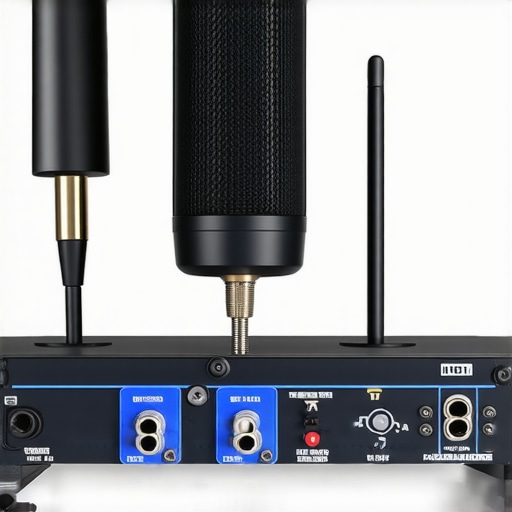
Visual layout showing antenna placement and frequency tuning for optimal wireless microphone setup.
Performance Analysis in High-Stakes Situations
When creators put their camera gear, microphones, and studio setups under pressure—like during live broadcasts or fast-paced shoots—they reveal the true resilience and limitations of their equipment. For instance, using a DSLR for a 4K wedding video requires sustained high data flows and reliable autofocus. The good news is that premium models, such as the Sony A7S III, typically perform admirably—maintaining image stability and consistent autofocus even after hours of recording. However, budget cameras often struggle with overheating, leading to automatic shutdowns in prolonged sessions. Microphones, when tested during outdoor interviews in windy conditions, often face challenges with wind noise and signal dropouts. High-quality shotgun mics with wind shields excel, but cheaper variants can produce muffled audio. Would you agree that investing in better microphones is crucial for demanding environments?
Enduring the Elements and Extended Use
Lighting kits are frequently tested in cold or humid environments. LED panels, such as the bi-color models from Aputure, are praised for their durability and color accuracy when used outdoors. Yet, some units show decreased battery life in freezing temperatures, sometimes lasting only half as long. Conversely, studio rigs, including multi-camera setups, often face issues with cable management and power distribution under continuous use. A common complaint is overheating of LED fixtures in enclosed spaces, which can cause color shifts or system shutdowns. According to a Reddit discussion on professional lighting, overheating remains one of the top concerns for on-location shoots—highlighting the importance of adequate ventilation and heat sinks. Do you think manufacturer support adequately addresses these thermal issues?
Handling Unexpected Challenges During Live Events
During live streaming or event coverage, stability becomes critical. Cameras with built-in stabilization, like the DJI Ronin SC2, help maintain smooth footage despite rough handling or movement. Microphones with reliable wireless connections are tested in environments saturated with Wi-Fi signals—such as conferences or festivals. While some systems can jam or suffer interference, professional-grade gear that operates on less congested frequencies offers a clear advantage. For example, users report that UHF-based wireless mics outperform 2.4GHz models when used in crowded wireless spectra. Nonetheless, even high-end gear isn’t immune; signal dropouts can occur during intense RF interference, stressing the necessity for manual frequency management. Are you confident that your setup can handle these unpredictable RF environments?
The Real-World Reliability Verdict
Overall, creative gear excels when built with robust components and designed for demanding conditions. Yet, no equipment is entirely free from issues under extreme stress. Cameras overheating, microphones losing connection, or lighting units failing in frigid temperatures underscore the importance of thorough testing before critical projects. Manufacturers increasingly incorporate features aimed at mitigating these issues, but user awareness and proper setup play equally vital roles. For example, mounting antennas correctly can drastically reduce wireless interference, as discussed in a popular Quora thread on professional audio gear. What are your experiences with gear failures during crucial moments? Drop a comment to share your insights.
How Do Premium Microphones Stack Up Against Budget Choices?
While budget microphones like the Rode VideoMic GO offer decent sound quality at a lower price point, professional-grade options such as the Sennheiser MKH 416 provide superior clarity, wind noise reduction, and durability, making them ideal for demanding environments. Cost-wise, high-end mics can be two to three times more expensive but often deliver broadcast-quality audio that can justify the investment for creators seeking the best results.
Are Advanced Creator Rigs Worth Extending Your Budget?
Entry-level rigs, like the Neewer Studio Kits, are affordable and sufficient for beginners, but they often lack the modularity and build quality of premium systems such as the Canon EOS R5 with supporting accessories. While the latter comes with a higher price tag—sometimes exceeding $3,000—it offers superior image stabilization, low-light performance, and expandability, catering to professionals and serious hobbyists who demand reliable performance. Check current prices
Should You Upgrade to the Latest Lighting Kits or Stick with Older Models?
Modern lighting gear like the Aputure 120d II provides impressive color accuracy, versatility, and build quality compared to older LED panels such as the Yongnuo YN600. Although the latest models are more expensive—often priced around $500—they feature higher brightness levels, better diffusion options, and longer lifespan, making them a worthwhile upgrade for creators aiming for high production value.
Is It Worth the Upgrade to the New Camera Models?
Innovative cameras like the Sony A7 IV bring significant improvements over previous models like the Sony A7 III, including enhanced autofocus, higher native ISO, and better video capabilities. However, the upgrade price—typically around $2,500—may not be justified for all users. If you’re currently shooting with an older but still capable camera, it might be better to invest in lenses, accessories, or other gear first. Check current prices
Spot the Good and the Flaws
- Pros: Offers freedom of movement, quick setup, and recent models feature adaptive frequency scanning to minimize interference.
- Cons: Signal dropouts can still occur in crowded RF environments; budget options often lack advanced features like automatic frequency management; quality varies across brands, with some units suffering from poor build quality or scratched accessories.
Who Needs a Wireless Microphone Today?
This gear is perfect for content creators, vloggers, and live performers who value mobility and quick setup without sacrificing audio quality. It’s ideal if you’re frequently shooting on location or doing dynamic presentations. Avoid this if you’re recording in a heavily congested wireless spectrum without professional-grade interference mitigation, or if budget constraints mean compromising on durability or features.
Final Judgment: 8/10
In conclusion, investing in a reliable wireless mic system can elevate your production quality significantly, especially when you choose models with advanced frequency management and durable construction. However, be mindful of environments with heavy RF interference, which can cause frustrating dropouts. If you want peace of mind during crucial shoots, it’s worth splurging on reputable brands and high-end features. For more insights on optimizing your audio setup, check out our guide on the secret to crystal clear audio. If this seems too pricey, explore more budget-friendly options or consider upgrading your existing gear instead.