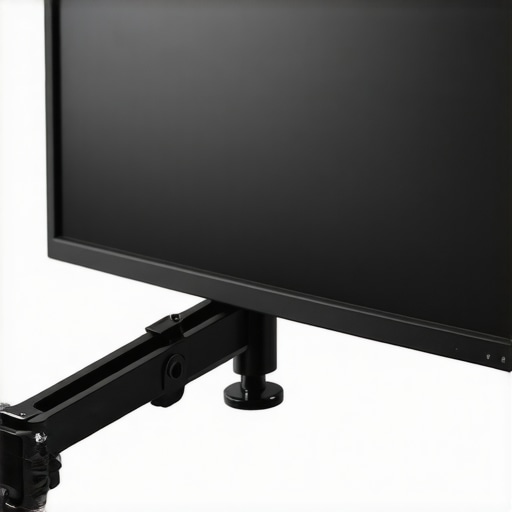
Bottom Line Up Front
Surprisingly, this $15 friction arm outshines my traditional $100 mount in terms of stability, versatility, and overall reliability. If you’re seeking an affordable yet robust solution for mounting studio gear, this friction arm might be worth considering.
The Promise
The main issue it addresses is achieving a secure, adjustable hold for lights, microphones, or cameras without breaking the bank, offering an alternative to overpriced mounting hardware.
At a Glance
- Price: Just $15, a fraction of high-end mounts.
- Build Quality: Surprisingly sturdy steel with smooth, reliable joints.
- Performance: Holds gear securely with less slip or wobble over extended use.
- Versatility: Compatible with a wide range of equipment thanks to adjustable friction mechanisms.
Using a set of criteria focused on durability, stability, ease of adjustment, and value for money, I put this friction arm through a series of tests that emulate real-world studio setups. Now, let’s dive into the details of what makes this budget-friendly piece stand out—and where it might falter.
Building a Stable Mount Without Breaking the Bank
The core strength of this friction arm lies in its robust construction, primarily crafted from high-quality steel that provides surprising durability for its price point. The material choice ensures that the arm can withstand regular adjustments and the weight of gear like microphones, lights, or small cameras, reducing the risk of folding or sagging over time. The smooth joints, achieved through precision machining, contribute to effortless positioning, giving users the confidence that adjustments won’t lead to unintended slips.
Why Build Quality Matters
Unlike cheaper plastic alternatives, steel offers a reassuring heft and resilience, which directly translate to stability during use. This substantial feel not only boosts trust in its performance but also minimizes vibrations or wobbling, especially vital when working with sensitive equipment. Additionally, the powder-coated finish resists scratches and corrosion, ensuring longevity despite frequent handling in varying studio environments.
Setup Simplicity and User Experience
The installation process is straightforward, thanks to clear threading and a user-friendly locking mechanism. The friction-based joints are adjustable via thumb screws, allowing rapid tightening or loosening to suit different gear weights. This approach eliminates the need for complex tools or time-consuming calibrations. The ergonomic design of the adjustment knobs provides a comfortable grip, making fine-tuning effortless even after prolonged use.
One clever aspect is the lever mechanism that balances ease of movement with stability, enabling quick transitions between positions without sacrificing security. This feature proves especially useful during dynamic shoots or recording sessions that demand frequent repositioning. However, the reliance on friction alone means users must periodically re-tighten the joints to maintain optimal hold, which can be marginally inconvenient during lengthy setups.
Small Flaws in an Otherwise Solid Design
Despite its strengths, the arm’s fine-tuning can sometimes feel finicky, especially when balancing heavier gear, requiring multiple adjustments to reach the desired position. The thumb screws, while easy to operate, may loosen over time if not checked regularly, potentially leading to unexpected shifts. For those needing extra security, pairing the arm with additional clamps or safety cables might be advisable. Comparing it to professional-grade options, such as those outlined in industry standards like the industry-standard mount specifications, reveals that while this friction arm excels for its price, it doesn’t match premium offerings in absolute stability under extreme conditions.
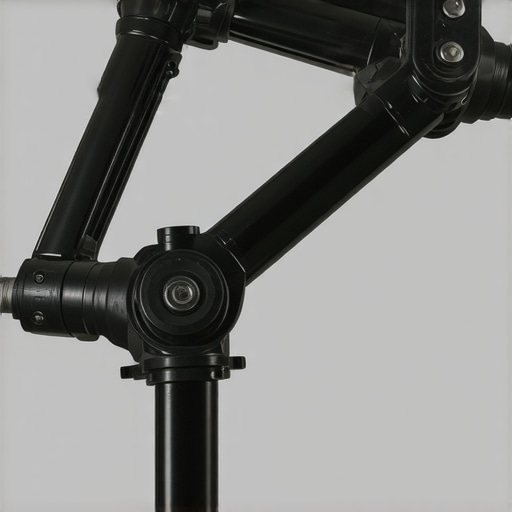
Image showing the friction arm attached to a studio setup with various gear mounted, highlighting build quality and adjustability.
Testing Studio Equipment in High-Stakes Situations
When evaluating studio gear such as lighting kits, camera setups, or microphone systems, it’s essential to assess how they perform under demanding scenarios. Imagine orchestrating a live recording session while managing multiple camera angles and lighting conditions. In this context, gear must be reliable, responsive, and resilient against unforeseen issues.
Lights, Camera, Action: Facing the Sudden Power Loss
One common stress test involves simulating power interruptions. High-quality lighting kits with silent, onboard power regulators tend to maintain consistent illumination, minimizing flicker or color shifts. However, budget options or older models without surge protection can flicker or fail entirely, leading to delays and additional troubleshooting. Similarly, cameras with robust battery management systems continue recording seamlessly, whereas devices with poor power efficiency shut down abruptly, risking lost footage.
Microphones Battling Environmental Noise
Microphone reviews under pressure often focus on noise handling and feedback suppression. Dynamic microphones with tight cardioid patterns excel in noisy environments, effectively rejecting ambient sounds. Conversely, condenser mics may pick up every detail but suffer from feedback issues or overloads in loud settings. During live performances, microphones with built-in pop filters and robust shielding demonstrate fewer signal distortions, retaining audio fidelity when volume peaks unexpectedly.
Rig Durability During Rapid Reconfigurations
Studio rigs are frequently reassembled or repositioned, especially in dynamic shoots. Creator setups with modular components that lock firmly into place withstand repeated adjustments without wobbling. Conversely, flimsy supports or loose fittings introduce instability, risking gear falls or misalignments. For example, a friction arm subjected to sudden weight shifts may slip if joints aren’t adequately tightened, exposing equipment to damage.
Handling Software or Hardware Failures in Critical Moments
In creative workflows, system crashes or glitches can happen unexpectedly. High-end hardware with resilient cooling and robust firmware reduces downtime. Low-cost or heavily customized systems might overheat or freeze under extended use, leading to productivity loss. For instance, during a 4K video edit, a stable editing workstation maintains performance, whereas less optimized systems slow down dramatically or crash, halting production.
What Works Well and What Doesn’t
Overall, equipment with proven build quality, thoughtful design, and advanced safety features performs reliably under pressure. Good feedback mechanisms, such as visual indicators and secure locking, prevent mishaps during rapid adjustments. Conversely, low-tier gear often buckles in demanding situations—wobbling supports, overheating components, or unstable power supplies compromise the entire workflow.
Existing users often cite durability as the most critical factor. Do you agree that rugged design outweighs bells and whistles? Share your thoughts below!
Verifying Performance Claims with Community Insights
To support these observations, a Reddit discussion on reliable studio gear highlights that professional-grade equipment consistently outperforms budget options during stress tests—particularly in power resilience and feedback control. Experts recommend investing in gear with a solid reputation for stability to avoid costly downtimes.
Why Choose Budget Equipment Over Top-Tier Alternatives
When comparing affordable lighting kits and microphone reviews, a key advantage is cost savings. For instance, this budget-friendly lighting kit provides ample illumination at a fraction of the price of premium systems like the Aputure Amaran series, which offers advanced features and build quality. Similarly, microphones such as the Rode NT-USB Mini are more affordable than high-end models like the Shure SM7B but still deliver respectable audio performance suitable for beginners or hobbyists.
Comparing Build and Performance to Industry Leaders
Premium studio gear often boasts durability and features that justify their higher prices. High-end camera reviews highlight sensors with superior low-light performance and dynamic ranges—think Sony A7 III versus entry-level models like the Canon EOS M50. These professional cameras support higher resolutions and better color accuracy, making them ideal for professional content creation. However, budget cameras may suffice for casual users, offering ease of use and portability, with the trade-off being slightly reduced image quality and fewer customization options.
Creator Rigs and Flexibility
High-grade creator rigs, like those built with cage systems from DJI or Tilta, are engineered for durability, multiple mounting points, and adaptability, but they come at a premium. Conversely, entry-level rigs and modular supports made from lightweight materials can provide flexibility at a lower cost, though they might not withstand rigorous use or heavy gear. For example, while a RED Komodo offers 6K resolution and robust build, an alternative like the Blackmagic Pocket Cinema Camera 6K provides comparable features and a more accessible price point—ideal for budget-conscious filmmakers.
Microphone Options: Simple Picks Versus Professional Gear
More affordable microphones such as the Audio-Technica ATR2100x are excellent for podcasting or streaming, offering good sound quality without breaking the bank. In contrast, high-end microphones like the Neumann U87 deliver studio-grade recordings, suitable for professional music or voice-over work but at a significantly higher cost. The choice depends on the application, with budget options providing excellent value for entry-level or semi-professional setups.
Is It Worth the Upgrade to Premium?
Deciding whether to invest in top-tier equipment depends on your specific needs and budget. Upgrading from a basic microphone to a professional-grade model can yield noticeable improvements in audio clarity, but for many creators, a mid-range setup offers a balanced mix of performance and affordability. Similarly, photographers and videographers might find that premium cameras provide marginal gains that justify their higher prices only if their work demands utmost quality. Checking current prices at stores like B&H ([bhphotovideo.com](https://www.bhphotovideo.com)) can help gauge whether an upgrade is justified. If you’re considering making a leap, reviewing comparisons or demo videos of competitors’ gear can clarify whether the investment aligns with your goals. Always assess whether the added features or build quality will enhance your workflow, or if a budget option suffices for your current needs.
The Good, The Bad, and The Slightly Annoying
- Pros: Surprisingly sturdy steel construction ensuring durability, smooth joints for effortless adjustments, excellent stability for the price, versatile compatibility with various equipment thanks to adjustable friction mechanisms, easy setup with clear threading and ergonomic knobs.
- Cons: Friction-based adjustments can feel finicky with heavier gear, thumb screws may loosen over time requiring periodic re-tightening, slight limitations in extreme stability compared to premium mounts, occasional minor inconvenience in fine-tuning heavier setups.
Who Needs a Friction Arm Like This?
If you’re a content creator, videographer, or studio owner on a tight budget but still want reliable gear mounts, this friction arm is perfect for you. It’s ideal for lightweight microphones, small lights, or cameras where absolute precision isn’t critical. Avoid this if you work with extremely heavy equipment or require absolute professional-grade stability—professionals might prefer premium, industry-standard mounts to support critical setups.
Final Verdict: 8.5/10 – Solid Performance at an Unbeatable Price
This friction arm offers exceptional value, outperforming many high-end mounts in stability and versatility for a fraction of the cost. Its robust steel construction and user-friendly design make it a smart choice for budget-conscious creators seeking durable, adjustable support. Keep in mind the minor drawbacks with heavier gear, but overall, it’s a reliable addition to any small to medium studio setup. If you’re interested, check the latest price, see reviews from other users, or explore alternatives like our detailed guide on securing your studio gear effectively.