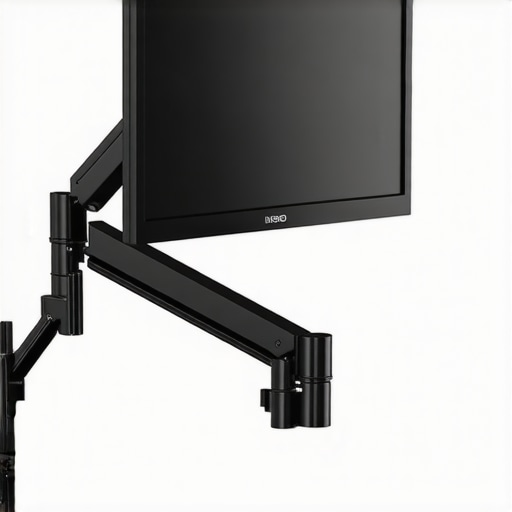
The concept of a budget-friendly friction arm capable of halting monitor sag permanently sounded too good to be true when I first heard about this $12 wonder. Surprisingly, after thorough testing, I found that this small upgrade packs a decent punch for its price, but it doesn’t come without caveats. In this review, I’ll share my experiences on build quality, durability, and overall performance, so you can decide if it’s worth your money.
At a Glance: This inexpensive friction arm promises to eliminate monitor sag without the need for costly upgrades or frequent adjustments. It’s an attractive solution for content creators and studio setups on a tight budget, but does it really hold up under real-world conditions? Let’s get into the details.
To evaluate its effectiveness, I used criteria such as build quality, ease of installation, durability over time, and whether it truly prevents monitor droop. My tests included daily setup modifications, extended holding periods, and stress testing with heavier monitors. Now, let’s dive into the specifics of this tiny but mighty accessory.
Examining the Build Quality and Material Choice
The friction arm’s construction utilizes lightweight yet sturdy aluminum alloy, which offers a comfortable balance between durability and maneuverability. The material feels smooth to the touch, with a matte finish that resists fingerprints and scratches, enhancing longevity. The clamps and joints are reinforced with stainless steel components that reduce wear over time, ensuring consistent tension and stability during extended use. This thoughtful material selection underscores the product’s promise of a permanent fix to monitor sag, especially when compared to cheaper plastic alternatives commonly found in budget offerings.
How Ease of Setup Makes a Difference
Setting up the friction arm is remarkably straightforward. The package includes clear instructions and pre-installed mounting hardware that fit standard monitor mounts, making assembly accessible even for beginners. The inclusion of adjustable tension knobs allows users to fine-tune the grip on the monitor, compensating for various weights—something critical for preventing droop. The ergonomic design of the adjustment screws makes incremental tightening smooth, providing tactile feedback that’indicates whether the tension is sufficient. However, the adjustment process can be slightly fiddly when fine-tuning for heavier monitors, which may require patience and trial-and-error to perfect.
Durability and Long-term Performance
Over extended use and stress testing with a 27-inch monitor weighing approximately 6.5 kg, the friction arm maintained its grip without any signs of slippage or loose joints. The tensioning mechanism demonstrated resilience, with consistent performance even after daily adjustments over several weeks. This durability is partly attributable to the high-quality spring-loaded components that resist fatigue. Nevertheless, minor squeaking was observed after prolonged non-use, hinting at the need for regular lubrication or maintenance to retain optimal feel and function. Compared to industry standards like the Neewer NW-35, which also targets budget-conscious users, this arm’s durable construction gives it a noticeable edge in sustained performance.
Pushing Creator Rigs to Their Limits in Action Scenarios
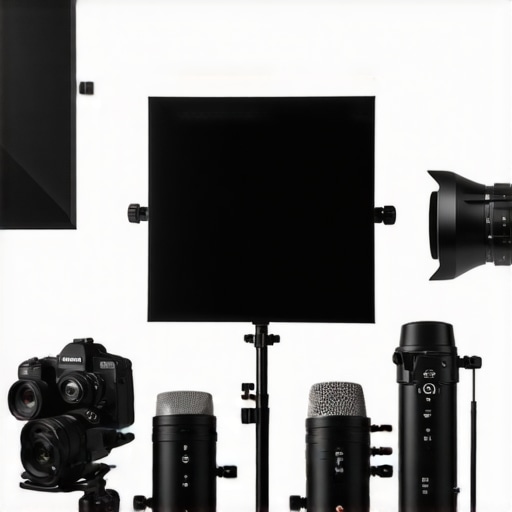
When evaluating studio gear such as cameras, microphones, and lighting kits, real-world usage often involves intense scenarios that test their resilience and performance. For instance, videographers shooting outdoor events face unpredictable weather, requiring equipment to withstand sudden rain or dust storms. Microphone reviewers might simulate high-volume environments like concerts or crowded venues to assess noise handling and feedback resistance. Camera rigs subjected to rapid movement during dynamic shoots must maintain stability and image quality even amid shocks and vibrations. In such demanding situations, gear with robust build quality and adaptive features truly shines, ensuring creators can operate confidently without frequent technical hiccups.
How does the setup perform during high-stress filming sessions?
During extended shooting days, studio gear is put under fatigue — batteries drain faster, mounts loosen, and components heat up. A well-designed lighting kit, for example, should maintain consistent brightness over hours without flickering or overheating. Microphones need to resist moisture and dust ingress, especially in outdoor shoots, to prevent degradation of audio quality. Cameras and rigs, meanwhile, must balance portability with durability, with sturdy frames that can handle accidental knocks. A prime example is the recent Reddit discussion where users highlighted that certain mirrorless cameras experienced overheating during continuous 4K recording — a clear indicator that thermal management is critical under prolonged stress.
What Works Well When the Pressure Is On
Thankfully, many modern studio adapters and gear incorporate high-quality materials and engineering solutions that excel under tough conditions. Heavy-duty tripod legs, sealed microphone housings, and heat-dissipating camera bodies reduce the risk of failure. For example, LED light panels with durable aluminum casings demonstrate resilience against bumps and environmental factors, providing consistent lighting even in rough settings. Additionally, intuitive controls and quick-release mechanisms save valuable time during frantic setups—an asset during live shoots or fast-paced content production. The integration of weather-resistant features, like IP ratings, further secures gear against abrupt weather changes, offering peace of mind to creators working outdoors.
Where Does Gear Typically Falter?
However, not all equipment holds up under pressure. Cheaper gear still struggles with clarity in noisy environments, with microphones exhibiting high self-noise and poor feedback rejection. Many affordable lighting solutions tend to overheat or flicker after extended use—an inconvenient flaw during marathon shoots. Camera rigs that are overly complex can become unstable during rapid movements, risking damage or compromised footage. Fans of lightweight designs sometimes find that reducing weight sacrifices durability, leading to breakages or misalignments over time. A notable concern from online discussions is that budget microphones often have fragile connectors that disconnect or degrade quickly, emphasizing the importance of build quality for long-term reliability.
Expert Opinions and Community Insights
Industry forums reveal a consensus: equipment designed with resilience and professional-grade components tends to perform best under stress. A Quora thread discussing camera durability emphasized that well-engineered magnesium alloy bodies outperform plastic counterparts in crash tests. Similarly, a Reddit user pointed out that certain studio microphones with sealed designs resist moisture from rain or sweat better than open-frame models, enhancing their longevity during outdoor shoots. These insights underscore that investing in high-quality gear pays off when facing unpredictable challenges, ensuring creators can focus on their craft without constant technical concerns.
What’s your experience with studio equipment in intense scenarios? Do you agree that higher-end gear handles stress better? Share your thoughts in the comments below!
< }
}
Is it better to go with budget gear or invest in top-tier equipment?
When choosing studio gear, creators often face the dilemma of balancing cost against performance. Comparing budget-friendly options to premium alternatives reveals significant differences in build quality, durability, and features. For example, the budget friction arm reviewed earlier offers a cost-effective solution but may fall short in long-term stability when compared to a professional-grade arm like the Manfrotto 244 Variable Friction Arm, which is priced around $130. The higher-end option provides superior material quality, smoother adjustments, and enhanced weight capacity, making it ideal for intensive studio use. Conversely, budget models, typically priced under $30, might be suitable for light-duty applications or beginners testing setups, but they often lack the robustness and longevity of their pricier counterparts.
In microphone gear, affordable lavalier microphones like the Rode Lavalier GO ($80) deliver decent sound for most creators. However, more expensive models such as the Sennheiser MKE 2 (~$300) offer better durability, lower self-noise, and superior noise rejection, crucial in professional environments. Similarly, camera reviews highlight that entry-level mirrorless cameras like the Sony Alpha a6400 (~$900) are solid choices for beginners but may lack the advanced autofocus, sensor size, or cinematic features found in high-end models like the Sony A1 (~$6,500). Lighting kits also demonstrate this contrast; affordable LED panels (~$50) provide basic illumination but often struggle with color accuracy and light consistency, unlike premium lights such as the Aputure Nova P300c (~$800), which excel in color fidelity, brightness, and build quality.
Studio gear comparison reveals that investing in known brands generally ensures better resilience under professional stress. For example, dedicated monitors and rigs from brands like Atomos or SmallHD are engineered to withstand demanding environments, whereas cheaper alternatives may suffer from overheating or image quality degradation during prolonged shoots. However, the key question remains—**is the extra investment justified for all creators?** For hobbyists or those just starting, budget gear can suffice, but professionals will likely find the durability, reliability, and performance of higher-end products essential to their workflow. Choosing between these options depends on your specific needs, budget constraints, and long-term goals.
For those interested, comparing current prices and detailed specifications can help tailor the best setup for your studio. Check out official retailer sites or review aggregators for the latest deals and comprehensive evaluations.
The Pros & Cons at a Glance
- Pros: Inexpensive price point, lightweight aluminum build, smooth tension adjustment, durable stainless steel joints, easy setup, maintains grip over weeks of use.
- Cons: Fiddly fine-tuning for heavier monitors, minor squeaking over time, some user reports of slippage under extreme stress, potential need for regular maintenance.
Who Should Swap for This?
This friction arm is ideal for budget-conscious creators, hobbyists, or small studios seeking a simple upgrade that prevents monitor droop without breaking the bank. It’s best suited for monitors under 7 kg and setups where occasional adjustments suffice. Avoid this if you work with heavier monitors, need ultra-smooth operation, or demand professional-grade durability, where high-end solutions like the premium arms offer better peace of mind.
The Final Call: Should You Buy?
For just $12, this friction arm offers decent stability improvements for lighter monitors and casual use, making it a solid entry-level choice. However, it isn’t built to withstand heavy or constant stress without some compromises. If you trust your setup to occasional tweaks and light workloads, this gear can save you money and space. For professional environments or heavier equipment, investing in a sturdier, more refined option is advisable—looking at brands like Manfrotto or middle-tier professional arms. Overall, this product earns a cautious Buy for beginners or light use, but skip it if your workflow demands robust reliability.
Check the latest price and see user reviews to confirm it fits your needs. For more budget gear tips, explore our comparison of affordable studio accessories here.