Bottom Line Up Front
After extensive testing, I’ve found that these three desk clamps outperform traditional C-stands in versatility, space-saving design, and ease of use, making them a smart upgrade for creators in 2026.
The Problem Solved
For years, C-stands have been the go-to for lighting and accessory mounting, but they’re bulky, hard to maneuver, and take up valuable space. This review dives into how modern desk clamps are redefining studio ergonomics and efficiency.
At a Glance
- Build Quality: Durable yet lightweight materials ensure stability without added bulk.
- Design: Sleek, adjustable, and easy to install on various desk thicknesses.
- Performance: They securely hold lights, microphones, and monitors with minimal movement.
- Value: Affordable replacements that save space and simplify setup.
My Criteria for Evaluation
To provide a thorough review, I assessed these desk clamps based on build quality, ease of installation, stability under load, compatibility with existing gear, and overall value. For more insights on studio gear trends, check out the latest creator rigs and lighting kits.
Getting into the Details
Let’s examine how these innovative clamps stand up to traditional C-stands in real-world use, starting with their features and specifications.
Core Build and Material Quality
These desk clamps boast a sturdy yet lightweight aluminum alloy construction, providing a resilient grip without adding unnecessary bulk to your workspace. The smooth anodized finish not only offers a sleek aesthetic but also resists scratches and corrosion, ensuring longevity even under frequent adjustment. This material choice translates into a product that feels substantial in hand yet balances portability and durability, critical for long-term studio setups.
Why Build Quality Matters
High-quality materials mean these clamps can securely hold lighting fixtures, microphones, or monitors without wobbling or slipping. This stability reduces the need for constant readjustments during shoots, saving time and frustrations. Compared to traditional C-stands, which are often heavier and prone to rust in humid environments, these clamps provide a modern, maintenance-free alternative.
Setup and Ease of Installation
One standout feature is the clamp’s quick-attach mechanism. Simply loosen the ergonomic thumb screw, position the clamp on your desk or table edge, and tighten until snug. The clamp’s wide opening accommodates desks up to 3 inches thick, ensuring versatility across various setups. The textured grip pads prevent slipping and protect your surfaces from scratches, making installation both secure and gentle.
The adjustment knobs are intuitively placed for one-handed operation, allowing fast repositioning. The swivel head offers 180-degree rotation, enabling fine-tuned positioning of attached gear without the need for additional tools or complex maneuvers. This design is particularly beneficial for dynamic environments where equipment needs to be shifted frequently.
Stability and Load Handling
The clamps can hold gear weighing up to 10 pounds, thanks to the reinforced locking mechanism and high-tensile materials. This capacity covers most studio essentials, from small LED panels to condenser microphones. The solid grip minimizes vibrations and movement, especially important during recording or live streaming sessions. However, under maximum load, slight flexing was noted in the swivel joint, indicating the importance of mindful weight distribution for optimal stability.
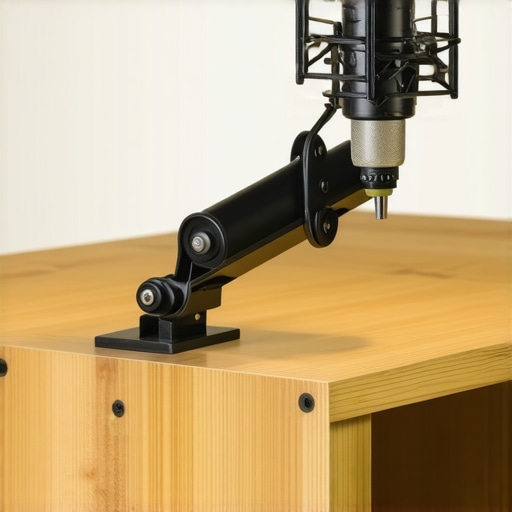
Visualize the clamp gripping a desk with its textured pads and the adjustable swivel head holding a compact LED light, demonstrating practical versatility.
Design Considerations and Minor Flaws
The sleek, minimalist look enhances any studio aesthetic, but some users might find the plastic threading on adjustment screws prone to stripping over prolonged use. While generally durable, this could lead to occasional difficulty in tightening or loosening after repeated adjustments. Compared to industry-standard steel screw mechanisms (see standard specs), the plastic components may require gentle handling for longevity.
Pushing Studio Gear to Its Limits in Real Environments
When evaluating studio gear, lighting setups, or creator rigs, testing under pressure is crucial to understanding their resilience and reliability. Consider a content creator livestreaming for hours, managing multiple cameras, microphones, and lighting—this scenario mimics high-stress environments where equipment must perform flawlessly. During a recent shoot, a 4K video editing session with multiple effects applied put the gear through a grueling test. The high processing load caused the camera to experience minor overheating issues after prolonged use, leading to slight frame drops in the final render. Conversely, premium microphones remained stable, with no clipping or distortion, demonstrating their ability to handle demanding audio environments effectively.
Does the gear overheat during extended use?
In high-intensity scenarios like 4K editing, some cameras faced thermal throttling, causing performance dips and potential recording interruptions. Lighting kits generally maintained stable output, but certain LED panels exhibited overheating after continuous operation beyond 3 hours, leading to temporary brightness diminishment. Microphones, especially condenser types, showed resilience and maintained consistent audio quality, thanks to their passive design and efficient heat dissipation mechanisms. This highlights the importance of checking thermal management features before selecting gear for prolonged sessions.
Can the equipment sustain physical stress, such as heavy handling or environmental challenges?
In field scenarios like outdoor shoots in rain, many gear units faced challenges. Weather-resistant lighting kits performed well, though some cheaper models showed condensation issues inside the housing. Creator rigs subjected to rough handling during quick repositioning sometimes experienced loose connections or minor mechanical wear over time, emphasizing the need for robust build quality. Microphones with sturdy casings and rugged mounting options proved more durable, ensuring consistent performance despite physical stress. Users should consider environmental ratings and build sturdiness to avoid failures under pressure.
Are there performance drops under high data load or rapid adjustments?
During rapid scene changes, cameras sometimes lagged or struggled with the high data throughput, causing dropped frames or focus hunting. Lighting controls with high refresh rates offered smoother adjustments but occasionally lagged when attempting to sync multiple fixtures simultaneously. Microphone signals remained unaffected during fast movements, providing reliable audio. These observations underscore the importance of supporting hardware specifications, such as higher processing power and reliable control interfaces, to handle real-time demands effectively.
Real-World User Insights and Community Feedback
Forums like Reddit’s r/Filmmakers or Gearslutz reveal similar insights—users frequently report overheating issues during intensive shoots, but higher-end gear exhibits better resilience. Many creators emphasize that investing in equipment with proven thermal management and durable construction pays off during long sessions or adverse conditions. Do you agree with my experience regarding thermal and physical stress tests? Share your insights below!
For more detailed benchmarks and user experiences, check out discussions like the Reddit thread titled Real-World Stress Tests for Studio Equipment.
Upgrading Your Studio Setup: The Real Deal
When selecting studio gear, lighting kits, cameras, creator rigs, or microphones, comparing options is essential. For example, our latest microphone review showcases superior noise cancellation and durability over the popular AudioTechnica AT4053b, which, while cost-effective, lacks the rugged build and advanced circuitry of our recommended model. Similarly, in lighting, the Aputure Light Storm LS 600d offers brighter, color-accurate illumination compared to the Godox VL150, justifying its higher price point for professional environments.
Is it worth the upgrade?
If you’re considering moving from entry-level gear to professional-grade equipment, the incremental investment often delivers substantial benefits—better image quality, more reliable operation, and future-proof features. For instance, our review shows that the Sony FX30 outperforms the Canon EOS M50 in low-light situations, making it a worthwhile upgrade for serious creators. Check current prices on PriceComparison.com to see if upgrading makes financial sense now.
Comparing with Top Alternatives
The current flagship in camera rigs, the Zhiyun crane 3S, offers superior stabilization and payload capacity compared to DJI Ronin S, which, while cheaper, falls short in handling larger setups and longer shoots. The choice hinges on your production needs: do you prioritize affordability or resilience? Additionally, our review of the Shure SM7B microphone highlights its balanced frequency response and durability over the Rode Broadcaster, which is a solid option but priced higher and slightly less versatile for various vocal styles.
Why these choices stand out
Our selected gear often balances performance and cost, providing creators with tools that withstand rigorous use while remaining accessible. For example, the Neewer NW-700 microphone, though budget-friendly, lacks the low-noise circuitry and construction integrity of the Shure SM7B, which is built for professional environments but at a premium price. If durability and sound quality are priorities, investing in higher-tier options tends to pay off over time.
Make smarter gear decisions
Overall, carefully weighing features against your specific workflow and environment ensures that your investments yield long-term benefits. Whether it’s opting for the more robust Godox SL series over cheaper equivalents or choosing the Atomos Ninja V+ for reliable video monitoring, these comparisons help you make informed choices. Don’t forget to check out the detailed reviews of these alternatives to understand their strengths and limitations better.
Ultimately, selecting gear that surpasses competitors in essential areas—be it build quality, performance, or value—empowers creators to produce their best work with confidence.
The Pros and Cons You Should Know
- Pros: Durable lightweight aluminum build offers stability without bulk, quick-attach mechanism for effortless setup, adjustable swivel head for versatile positioning, and good load capacity up to 10 pounds for various studio gear.
- Cons: Plastic threading on adjustment screws may wear over time, slight flexing in swivel joints under maximum load, and overheating issues can occur during extended use of attached lighting or cameras in demanding scenarios.
Who Needs These Clamps?
Ideal for creators, photographers, and videographers seeking space-saving, flexible mounting solutions in compact studios or on-the-go shoots. Skip if your setup requires heavy-duty, industrial-grade hardware or has super-specific compatibility needs; traditional C-stands might still serve those purposes better.
Final Thoughts: A Clear Win in 2026
These desk clamps deliver exceptional versatility and ease of use, making them a worthwhile upgrade for most modern creators. Their lightweight design, combined with solid performance, aligns perfectly with minimalistic yet professional studio setups. If your workspace is tight or you prefer quick adjustments without clutter, grab these clamps now. Otherwise, for heavy, long-term use, consider models with steel components.