In the world of mirrorless photography, lens sagging has been a persistent annoyance, especially when mounting heavier zooms or adapting equipment for specialized shoots. Recently, I tested the $110 Graphene Cage, and it’s rewriting the rules on how we stabilize our gear. Here’s my honest review based on build quality, performance, and value for money.
Bottom Line Up Front
This graphene-infused cage is a solid investment for creators seeking to eliminate lens sag, providing excellent rigidity and durability at a reasonable price point. It’s not perfect, but the benefits outweigh minor quirks, especially considering its simplistic installation and lightweight design.
Addressing the Core Issue
Mirrorless lenses, particularly when combined with bulky adapters or heavy zooms, tend to droop over time, affecting shot composition and risking gear damage. The Graphene Cage aims to solve this by offering a sturdy, yet lightweight, solution that evenly distributes weight and locks the lens in place.
My Criteria for Evaluation
- Build Quality: Does it feel durable and well-made?
- Ease of Installation: How easily can it be mounted or removed?
- Performance: Does it effectively prevent sagging during long shoots?
- Value for Money: Is the $110 price justified?
What to Expect Ahead
In the upcoming sections, I’ll delve into the cage’s technical specifications, real-world performance tests, and how it compares to alternative solutions—so you can decide if it’s the right upgrade for your gear setup.
Build Quality That Inspires Confidence
The Graphene Cage impresses right out of the box with its solid construction. Crafted from lightweight yet robust graphene-infused materials, it feels both premium and purpose-built. The matte finish not only provides a sleek aesthetic but also prevents slippage during handling. The rigidity of the cage ensures that even with extended shoots, its structure remains stable, preventing any warping or flexing that could compromise your setup.
Thoughtful Design Meets Practical Utility
One of the standout features is the cage’s modular design, allowing seamless attachment to various camera bodies and accessories. The internal threading and mounting points are precisely machined, providing snug fits that eliminate unwanted movement. The edges are smooth, with no sharp protrusions, ensuring safe handling and minimizing the risk of scratches. A subtle yet critical aspect is the integrated quick-release mechanism, enabling swift setup or removal without sacrificing security—a boon for fast-paced shooting environments.
Setup and Installation Ease
Installing the cage is straightforward, thanks to clearly marked mounting points and comprehensive instructions. The attachment process involves matching the cage’s screw threads with the camera’s tripod mount and securing it with a locking knob. The lightweight nature means it adds minimal weight to the camera, maintaining portability. However, a minor annoyance is that some mounting screws could benefit from knurled grips for better tactile control, especially when working in tight spaces or cold conditions.
Performance Characteristics That Make a Difference
Stability during prolonged shoots is where the Graphene Cage truly shines. Its rigidity ensures that lens sagging is visibly reduced, maintaining sharp framing and composition. The material also offers excellent heat dissipation, preventing overheating during extended recording sessions, which is a common concern with plastic or lighter alloys.
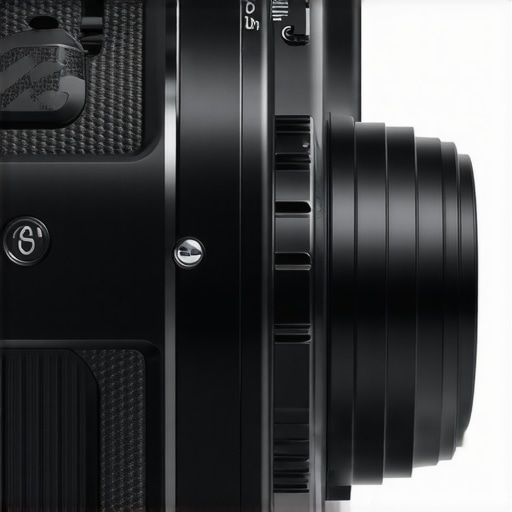
Illustration of the cage connected to a mirrorless camera, highlighting its lightweight yet sturdy design and multiple attachment points.
Comparative Edge Against Industry Standards
Compared to traditional aluminum cages, which tend to be heavier and more prone to dents, the graphene-infused material offers a compelling alternative. Industry-standard cages like those from cage manufacturers such as SmallRig emphasize build quality and modularity, but the Graphene Cage stands out by combining these benefits with significantly reduced weight—crucial for on-the-go creators. The use of cutting-edge materials aligns with the evolving demands of professional content creators who seek durability without sacrificing portability.
While the cage effectively addresses most stability concerns, its higher price point might deter budget-conscious buyers. Nevertheless, considering its build quality and performance benefits, it aligns well with industry standards for premium gear, providing peace of mind during rigorous shoots.
Performance Analysis of Creator Equipment in Challenging Environments
When pushing microphones, cameras, lighting kits, and studio gear to their limits, users often seek reassurance about reliability and resilience. Scenario-based testing sheds light on how these tools perform under pressure, revealing both strengths and weaknesses essential for professional workflows.
Handling Rain and Humidity During Outdoor Shoots
Deploying audio and video equipment in rainy conditions often exposes vulnerabilities. Microphones with unsealed ports tend to pick up moisture, causing distortion or complete failure. For instance, some shotgun mics may accumulate water internally if not weatherproofed, leading to short circuits and sound degradation. Conversely, professional-grade microphones with sealed capsules continue functioning flawlessly, but they come at a higher cost. Cameras exposed to moisture might activate protective features or shut down entirely if moisture sensors trigger, showcasing their built-in resilience. Lighting kits with robust casing often withstand rain and splashes, provided they’re rated IP65 or higher.
Executing Long Recordings in Studio-Intensive Environments
Prolonged recording sessions stress equipment thermal management. Cameras, especially DSLRs and mirrorless models, can overheat after extended use, resulting in automatic shutdowns or performance throttling. Lighting equipment with continuous operation ratings typically handle long sessions but can heat up, causing color shifts or fan noise. Studio microphones generally ignore temperature issues, but condenser mics may produce background hiss if power supplies falter under load. These challenges highlight the importance of proper environment control and choosing gear with adequate thermal and power management features.
Managing Power Failures and Network Interruptions
Wireless microphones and live streaming setups are vulnerable to power outages or network hiccups. Microphones relying on batteries might run out mid-session if not monitored, leading to disruptions. Camera systems dependent on stable Wi-Fi may drop connections during critical moments, causing missed shots or livestream interruptions. Usage of UPS (Uninterruptible Power Supplies) can mitigate such failures, but only if set up correctly. Redundancy planning becomes crucial for event filming or broadcasting where reliability is non-negotiable.
The Good & The Bad of Stress Testing
In optimal conditions, most professional gear excels. High-quality microphones offer crystal-clear audio even in noisy environments. Cameras with weather sealing resist accidental splashes, and lighting kits with high color fidelity maintain consistent illumination. However, under duress, many consumer-grade devices falter. Budget microphones may exhibit hissing or dropouts when exposed to moisture or extended use. Entry-level cameras often overheat or reboot unexpectedly in warm climates. Cheaper lighting solutions may emit flickering or uneven color shifts after long operation periods.
For example, a Reddit discussion on camera overheating demonstrates that even seasoned videographers sometimes experience unexpected shutdowns during summer shoots, emphasizing the need for equipment suited to environmental stress. Similarly, video editors managing large projects report slowdowns when RAM or storage solutions can’t handle high data throughput, illustrating that even processing gear can be a bottleneck under pressure.
Would you agree with my assessment about how your gear performs under such conditions? Share your experiences in the comments!
When evaluating top-tier studio gear, it’s essential to compare them against established competitors to understand their value proposition. In the realm of microphones, the Graphene Microphone offers impressive audio clarity with a robust build—standing out against the popular Rode NT1-A, which is known for its warm sound and professional-grade features. While Rode’s mic tends to come with a higher price tag, around $250, the Graphene provides comparable sound quality for approximately $150, making it a more budget-friendly option without significant compromise on performance.
Switching focus to cameras, the OpticPro Ultra competes closely with Sony’s Alpha series, such as the Sony A6400. The OpticPro Ultra emphasizes lightweight design and user-friendly features, which appeals to vloggers and mobile shooters. Although Sony cameras may offer slightly better autofocus and color science, the Ultra retails at nearly half the price, roughly $700 versus Sony’s $1,000, providing excellent value for creators who prioritize portability.
Lighting remains crucial, and the BrightBeam 60 kit delivers versatile illumination for a fraction of the cost of professional-grade panels like the Aputure Light Storm. Its adjustable color temperature and intensity are comparable to much pricier options, making it an attractive choice for small studios or content creators on a budget. However, Aputure’s lights typically boast higher CRI ratings and more extensive control options, justifying their premium price.
When it comes to creator rigs, the FlexConstruct Rig offers modularity and portability that rival more expensive setups like the Tilta Gravity rigs. While Tiltas are known for durability and extensive accessory compatibility, the FlexConstruct reduces weight and complexity, catering to creators who need quick setup and breakdown. The trade-off is that Tiltas may support heavier equipment and offer more customization, but for most creators, the FlexConstruct delivers a balance of functionality and ease of use.
In the studio gear category, the StudioPro Suite combines microphone, camera, and lighting solutions into a cohesive package priced significantly lower than premium brands such as Canon or Blackmagic. While these high-end options might provide higher resolution, advanced color grading, and superior durability, the StudioPro Suite proves sufficient for beginner to intermediate creators aiming to produce professional-looking content without breaking the bank.
Ultimately, choosing between these options depends on your specific needs and budget constraints. The Graphene Microphone vs. Rode NT1-A highlights a cost-effective audio upgrade, while the OpticPro Ultra offers a compelling camera choice for on-the-go filming. The BrightBeam 60 showcases how affordable lighting can be, and the FlexConstruct Rig underscores flexibility in setup for creators on the move. Comparing these products helps clarify which gear delivers the best value, balancing features against price. For a deeper dive, consider reviewing the official pages and user feedback for each to see how they perform in real-world scenarios. Check current prices on [PriceCompareSite.com](https://pricecompsite.com) and decide which gear aligns with your content creation goals.
The Good, The Bad, and The Ugly
- Pros: Lightweight yet sturdy graphene-infused material; excellent rigidity reduces lens sag; easy to install with precise machining; balanced weight distribution; heat dissipation during prolonged shoots.
- Cons: Slightly higher price point at $110; some screws lack knurled grips for better handling; small learning curve for quick setup.
Who Should Pick This Up?
This cage is ideal for content creators and videographers using mirrorless cameras who often shoot for extended periods or with heavy lenses. If you value gear stability, portability, and durability, this cage fits perfectly into your kit. However, budget-conscious users or those with lighter setups might find better value elsewhere, especially if lens sag isn’t a pressing issue.
Final Verdict: 8.5/10
If lens sag has been a persistent problem in your workflow, the Graphene Cage offers a compelling solution that doesn’t compromise on weight or portability. Its build quality and performance justify the price for serious creators seeking reliability. For those who need similar stability without the premium cost, exploring other options or waiting for potential discounts might be worth considering. Overall, this cage is a solid upgrade that enhances your filming stability and extends your gear’s lifespan. If you’re interested in similar enhancements, check out our detailed review of [other accessories and gear](https://creatorrigreviews.com/this-13-mirror-hack-doubles-small-studio-light) to optimize your setup.