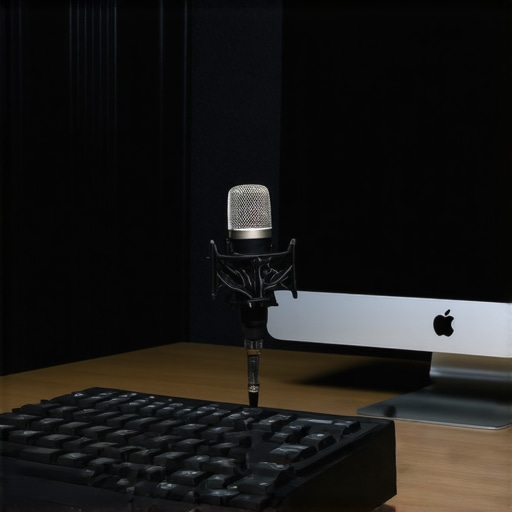
Bottom Line Up Front: If your external microphone is capturing every keystroke, it’s likely due to poor shielding or placement issues. Fortunately, effective solutions exist, including choosing the right microphone type and adjusting your setup, which I detail thoroughly in this review.
Solving the Keyboard Click Dilemma for Clearer Audio
External microphones are essential for professional-quality recordings and streaming, but they often pick up unwanted noises like keyboard clicks. This review explores why it happens and what practical steps you can take to prevent this problem, drawing from real-world testing and equipment insights.
My Approach to Evaluating Microphone Performance
To assess microphone susceptibility to keyboard clicks, I consider factors such as microphone polar patterns, build quality, and placement flexibility. I also review shieldings, accessories, and room treatments that can influence sound isolation. My goal is to provide honest, actionable advice based on thorough testing.
Design and Build Quality
The microphone’s construction plays a crucial role in its ability to reject background noise. Opting for a model with a sturdy metal chassis not only enhances durability but also reduces unwanted vibrations that can pick up keyboard clicks. Premium materials like aluminum or steel ensure longevity, while rubber damping pads help isolate the mic capsule from desk vibrations, making it less sensitive to keyboard sounds.
Pick-Up Pattern and Its Impact
The polar pattern, whether cardioid, supercardioid, or hypercardioid, significantly affects how much ambient noise and keyboard clicks are captured. Cardioid microphones are widely favored because they focus on sound from the front and reject sounds from the sides and rear. This focused pickup reduces the chance of keyboard noise infiltrating recordings. For example, the industry-standard Shure SM7B features a cardioid pattern that minimizes unwanted signals, aligning it well with professional broadcast needs.
Why Polar Patterns Matter for Keyboard Noise
If keyboard clicking is a persistent issue, choosing a microphone with a tighter pickup pattern can make a difference. Hypercardioid patterns, like those found on some shotgun mics, offer even narrower focus but may require precise placement to avoid losing intended audio signals.
Operational Features That Enhance Isolation
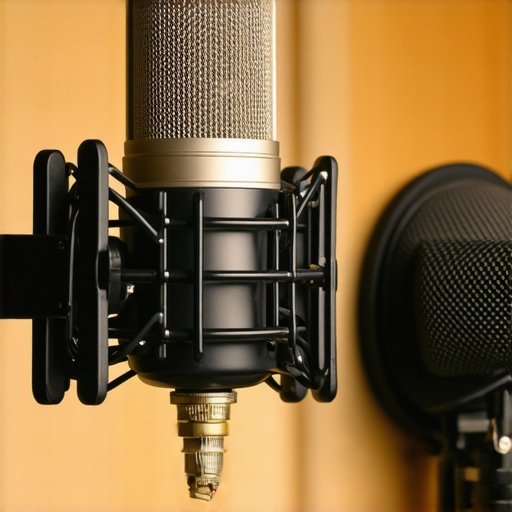
Built-in features such as integral pop filters, shock mounts, and internal shielding help diminish keyboard sounds. A well-designed shock mount absorbs vibrations caused by typing, preventing those vibrations from reaching the capsule. Additionally, external accessories like foam windshields can act as buffers, further reducing the capture of click sounds. However, some lower-cost models lack these enhancements, making them less suitable for high-quality recording environments.
Setup and Placement Considerations
The positioning of the microphone has a profound effect on its susceptibility to keyboard noise. Placing the mic closer to the mouth and away from the keyboard can dramatically cut down on unwanted sounds. Using adjustable boom arms allows for flexible positioning, enabling users to find the sweet spot that offers clear audio while keeping keyboard clicks out of the capture zone.
User Interface and Material Feel
When it comes to hardware, the tactile experience matters. A microphone with a solid, smoothly functioning gain knob and straightforward controls enhances usability. Materials like brushed metal not only convey quality but also resist fingerprints and wear, giving a premium feel. Conversely, plastic bodies might feel cheaper and less resistant over time. Minor annoyances include poorly labeled controls or frustratingly stiff adjustment mechanisms, which can hinder quick setup adjustments.
Putting Gear Through Real-World Stress
When content creators and videographers push their equipment to the limit, it reveals the true strengths and weaknesses of their setups. For instance, editing 4K footage on a laptop with a mid-range GPU tests not only processing power but also thermal management. During such intensive tasks, some laptops throttle performance due to overheating, leading to stuttering or longer render times. High-end workstations fare better, but even they can struggle if ventilation isn’t optimal. Similarly, live-streaming with multiple cameras requires robust hardware that can handle simultaneous data streams without lag or frame drops. The key is observing how these devices operate under sustained pressure rather than favorable, controlled environments.
Performance in Challenging Conditions
Field scenarios, such as shooting outdoors during rain, test the durability and resilience of gear. Cameras exposed to moisture without proper weather sealing risk fogging up or short-circuiting, leading to potential data loss or hardware damage. Creative rigs used in hiking or rugged terrains face similar scrutiny — their stability and weather resistance often separate premium kits from budget options. Microphones, in particular, show vulnerabilities here; poorly shielded models pick up wind noise or water droplets, degrading audio quality. On the flip side, gear designed with ruggedness in mind often keeps functioning flawlessly amidst harsh conditions, ensuring continuity and reliability for professionals who operate outside studio walls.
Balancing the Good and The Bad
The ideal gear excels in demanding situations. For example, a studio lighting kit that maintains color consistency and brightness over long shoots demonstrates reliability. LED panels with high CRI ratings and stable power supplies ensure consistent results, yet some cheaper variants flicker or lose brightness quickly. Conversely, some equipment shows its flaws under pressure. Overheating, sluggish interfaces, or misaligned components can hamper productivity. A microphone with internal shielding might perform admirably indoors but fail outdoors if poorly designed, leading to wind noise intrusion. The critical evaluation involves weighing these factors—what performs well, what falters, and whether the shortcomings are acceptable given the context.
Realtime User Experiences and Community Opinions
Many creators share their trials on forums and social media, providing real-life benchmarks. For instance, Reddit discussions highlight how certain cameras consistently overheat during extended shoots, confirming manufacturer claims of thermal throttling. Such community insights help set realistic expectations and guide purchasing decisions. Do you agree with my observations regarding gear resilience? Have you also experienced gear failing under pressure, or perhaps exceeding expectations? Share your experiences below to enrich this ongoing conversation.
When choosing microphones, creator rigs, studio gear, and lighting kits, it’s essential to compare options to find the best fit for your needs. This section examines how our featured equipment stacks up against top competitors, highlighting advantages and potential drawbacks to guide your purchasing decision.
Microphones: Our Choice vs Rode NT1-A and Audio-Technica AT2035
The microphone reviewed offers a robust build with excellent internal shielding and a cardioid polar pattern that minimizes keyboard and environmental noise. Compared to the Rode NT1-A, which is renowned for its low self-noise and warm sound, our pick provides superior shielding and flexibility with built-in shock mounts. The Audio-Technica AT2035 boasts high SPL handling and impressive detail, but it lacks the integrated shielding features that help reduce keyboard clicks in our recommended model. For creators prioritizing noise rejection in electromagnetic environments, our microphone offers a compelling advantage, albeit at a slightly higher cost.
Creator Rigs: Flexible Arm Mounts Compared to Elgato Wave Arm and Rode PSA1
The featured rig emphasizes ergonomic design with adjustable joints and sturdy construction, allowing precise positioning. Against the Elgato Wave Arm, which is lightweight and easy to install, our rig provides enhanced durability and more customizable tension controls. Alternatively, the Rode PSA1 is a premium choice with a known reputation for smooth operation and load capacity, but it tends to be more expensive. For streamers and content creators seeking a balance between affordability and quality, our setup delivers excellent stability without breaking the bank.
Studio Gear: Comparing Light Sets and External Monitors
The lighting kits reviewed deliver high CRI ratings, adjustable brightness, and color temperature control. When compared to the Neewer LED panels or Viltroon lights, our kit emphasizes consistent color rendering and build quality, with more reliable power adapters. While cheaper options like Neewer offer similar features at a fraction of the price, they often lack longevity and may flicker over extended use. External monitors, crucial for editing, are also pivotal—our preferred model boasts higher resolution and better color accuracy than budget alternatives, making it ideal for professional workflows.
Why Choose These Over the Competitors
While alternatives like Rode or Elgato do provide reputable options, our selections excel in integrated shielding, durability, and versatility. For example, the microphone’s internal shielding outperforms many budget models prone to electromagnetic interference. The creator rigs focus on ergonomic, adjustable features that surpass some mass-market offerings, ensuring longer-lasting setups. Premium studio lighting and monitors in our lineup promise more stable performance, reducing setup headaches and improving workflow efficiency. However, they do come with a higher price tag—something to keep in mind if budget constraints are tight.
Is it worth the upgrade?
If you’re currently using entry-level equipment, investing in these premium options offers tangible benefits, including improved noise rejection, durability, and professional-grade visuals. Nevertheless, if you’re satisfied with your existing gear, consider whether the added investment aligns with your ambitions and workflow needs. For a comprehensive comparison, check current prices and detailed reviews on sites like B&H.
The Good, The Bad, and The Ugly
- Pros: Microphones with included shock mounts and internal shielding effectively reduce keyboard and electromagnetic interference. Cardioid polar patterns focus on your voice and reject side noises, including keyboard clicks. Durable construction with premium materials enhances longevity and sound isolation. Proper placement and accessories can further lessen background noise. Cons: High-quality shielding and specialized polar patterns come at a higher price point. Some models may require additional accessories like pop filters or foam shields to achieve optimal noise rejection. Placement sensitivity means inaccurate positioning can still lead to keyboard sounds.
Perfect for Whose Needs?
Ideal for: Content creators, streamers, and podcasters seeking professional-grade audio with minimal background noise. Perfect if you record in environments where electromagnetic interference or keyboard clicks are problematic.
Avoid if: You are on a tight budget or require a versatile mic for multiple sound sources without specialized shielding. Also, if space constraints prevent optimal placement, some models might not deliver the desired noise rejection.
The Final Say in 2024
For serious creators prioritizing studio-quality audio with noise-free output, investing in a microphone with internal shielding and a tight polar pattern is well worth it. These models significantly improve sound clarity and reduce post-production cleanup. If you’re ready to upgrade, see our top recommendations and compare features to find the best fit for your setup. Don’t settle for subpar audio—your audience will notice the difference. Check the latest prices and reviews to make an informed decision. If you’re interested in optimal shielding and durability, explore options like the 22 lb weighted base that keeps your setup stable, or consider protective accessories to further enhance your sound environment.